
Last updated August 27, 2026 · Editorially reviewed by CanzarTV
HDR and International Streaming: Regional Variations in Delivery and Metadata
Introduction
High dynamic range (HDR) can deliver noticeably better contrast and color depth, but how HDR is delivered and signalled in a stream is not uniform worldwide. Encoding choices, metadata formats, content licensing, CDN configuration, and device support can all vary by country or region. That means a movie or live feed that looks one way in your home country may behave differently when you travel, or when the same service offers a regional feed in another market.
This article explains the main reasons for regional HDR differences, how metadata is used (and sometimes dropped or converted), what viewers should check on devices and apps, and practical steps both viewers and content operators can use to reduce surprises. The guidance targets readers in Canada, the United States, the UK and Europe and is intended to be evergreen and cautious — always verify current manufacturer and provider documentation for your device and service.
Why HDR delivery varies by region
Several layers in the streaming chain affect HDR delivery and the metadata that tells a TV how to display HDR content. Differences can arise for technical, commercial, and regulatory reasons:
- Encoding and packaging choices: Content distributors choose an HDR format (HDR10, Dolby Vision, HDR10+, HLG, etc.), metadata methods, and bitrates. These choices may differ between regional encodes.
- Licensing and codecs: Some HDR technologies are proprietary and require licensing; a provider may offer Dolby Vision in one market but only HDR10 in another based on commercial terms.
- Content sources and feeds: Broadcasters and rights holders may supply different masters or regional variants with different metadata, color grading, or dynamic metadata profiles.
- Delivery and CDN configuration: Transcoding profiles on CDNs or regional encoders can alter or strip dynamic metadata, or down-convert PQ to HLG (or vice versa) for broadcast compatibility.
- Device and OS support: TVs, set-top boxes, and mobile devices differ in which HDR formats and metadata versions they support, and manufacturers may enable or disable formats by region or model.
These factors mean HDR behavior is not purely a function of the video file — it also depends on how and where it is delivered.
Common HDR formats and metadata approaches (high level)
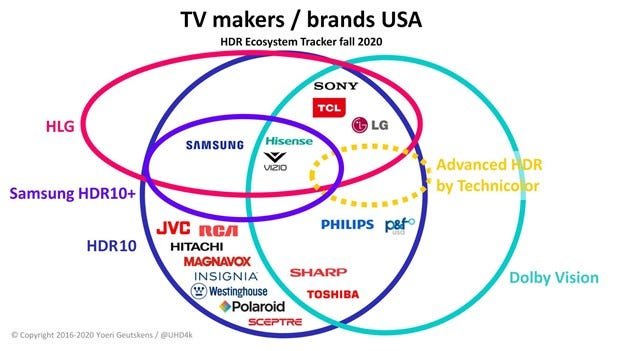
A quick, non-exhaustive overview of HDR approaches you’ll encounter in streaming:
- HDR10: Uses static metadata (SMPTE ST 2086 and related elements) describing mastering display color volume. Widely supported and commonly used for many streaming encodes.
- Dolby Vision: Uses dynamic metadata to adjust tone-mapping on a scene- or frame-by-frame basis; implementation and licensing can vary by provider and device.
- HDR10+: An industry format that adds dynamic metadata on top of HDR10-style streams; regional adoption and encoder support can differ.
- HLG (Hybrid Log-Gamma): A different approach designed for broadcast workflows; sometimes preferred by public broadcasters and live services in certain regions.
Because adoption and licensing vary, you may find a title encoded as Dolby Vision on one regional storefront, HDR10 in another, and HLG for a live broadcast feed.
How metadata differences affect playback
Metadata tells a display how the video was mastered and how to map that mastering to the display’s capabilities. Key ways that metadata differences show up:
- Tone mapping differences: Without dynamic metadata or with different static metadata, TVs may apply different tone-mapping, changing highlight detail and shadow rendition.
- Fallback to SDR or limited HDR: If a device does not support the signalled HDR format, the stream or app may fall back to SDR or to a lower-quality HDR presentation.
- Color volume mismatch: Discrepancies between the stream’s metadata and the TV’s expected metadata can lead to slightly different color saturation or white point rendering.
Because metadata can be static (same for the entire program) or dynamic (varying by scene/frame), conversions done by encoders or CDNs can materially change how the content looks.
Regional comparison: typical differences to watch for
Below is a comparison table showing common axes where HDR delivery may differ between regions. These are general patterns — specifics will vary by provider, device, and content owner.
| Area | Europe (typical patterns) | US & Canada / UK (typical patterns) |
|---|---|---|
| Preferred live formats | HLG is often used for broadcast-friendly feeds and some public broadcasters | HLG and PQ variants both used; live sports may use PQ-based HDR where supported |
| Consumer storefronts | Public broadcasters and some streaming platforms may offer HDR10/HLG; regional encodes may prioritize broad compatibility | Major streaming services often provide multiple formats (HDR10, Dolby Vision) where licensing and device reach allow |
| Metadata handling | Encoders on regional CDNs sometimes convert or simplify dynamic metadata for compatibility | Providers with broader device certification may preserve dynamic metadata (if licensing allows) |
| Device feature availability | Some TV firmware builds in certain countries may enable or disable vendor-licensed features | Device support tends to be similar but manufacturer firmware and app builds still cause variation |
Remember: these are tendencies, not rules. Always verify the streaming service’s published specs for a particular market.
Practical steps for viewers (travelers and residents)
If you travel frequently or watch international streaming feeds, these steps can reduce surprises and help you get the best experience:
- Check the app and firmware versions
- Keep your TV, set‑top box, and app updated. Manufacturers and streaming services regularly update HDR handling.
- Inspect the stream’s HDR signalling
- Many apps show an on-screen badge (HDR, Dolby Vision, HLG). If unsure, consult the provider’s playback info or a test clip.
- Test a sample clip
- Play a short HDR demo provided by the service to check color and highlights before starting a long program.
- Verify device settings
- TVs often have HDR, HDMI deep color, or dynamic range settings that can be toggled. On mobile devices, check brightness and battery/smart HDR options.
- Use official support channels
- When in doubt, check support pages for your TV, the streaming app, and the regional storefront. Don’t rely solely on crowd-sourced reports.
- Consider app-specific behavior
- Some services adapt streams by region; for example, a platform may offer Dolby Vision in Market A but only HDR10 in Market B due to licensing and certification.
If you operate or encode content, see the next section for suggestions.
Practical steps for content owners and engineers
Content and delivery teams can reduce regional variability by adopting clear practices and testing across target markets:
- Maintain multiple mastered variants (or a flexible master with dynamic metadata) so regional encodes can match the intended grading.
- Use proven packaging workflows and validate that your CDN/transcoder preserves required metadata (static and dynamic). Test sample segments from each regional edge.
- Document format choices per region and communicate them to platform partners and device manufacturers to avoid unexpected down-conversions.
- Where licensing restricts a format, provide a documented fallback (for example, HDR10 or a high-quality SDR pass) rather than letting transcoders apply undocumented conversions.
- Implement QA that includes devices and firmware builds commonly used in your target markets.
Notes of caution: hardware tone-mapping behavior varies across TV models and OS versions — so QA should include representative consumer devices rather than relying only on reference monitors.
Quick troubleshooting checklist for viewers
- Confirm the app shows an HDR indicator.
- Make sure the HDMI input and cable support the bandwidth and HDR signalling used by your device (if using external set-top boxes or game consoles).
- Update device firmware and the streaming app.
- Try the same title on another certified device (if available) to compare behavior.
- Reach out to the streaming service’s support and provide device model, firmware, and a short video/photo of the issue if asked.
For more detailed device setup tips, see our guides in the Devices & Setup and Streaming Guides sections.
FAQ
Q: Will the same movie always look the same in different countries?
A: Not always. The same title can be encoded differently across regions, use different HDR formats or metadata, or even be a different master. If exact fidelity is essential, verify the provider’s encoding specification for each market.
Q: My TV shows ‘HDR’ but the image looks washed out. Is that a regional issue?
A: A washed-out image can result from tone-mapping mismatches, incorrect metadata handling, or a device falling back to a poor SDR conversion. Check device settings, firmware, and whether the app is actually delivering HDR content in your region.
Q: If a service offers Dolby Vision in one country, can I expect it everywhere?
A: Not necessarily. Dolby Vision requires licensing and device certification; some providers limit Dolby Vision to markets where they’ve completed those steps. In other regions they may provide HDR10 or another fallback.
Q: Can CDNs strip or alter HDR metadata?
A: Yes. Transcoding or packaging steps in regional CDNs can remove or modify metadata for compatibility or efficiency. Content owners should verify end-to-end workflows and request metadata preservation where needed.
Q: Are there safe ways to test HDR on my own without buying specialized equipment?
A: You can use official HDR demo clips from streaming services or UHD test files provided by standards bodies and hardware manufacturers. For professional verification, a colorimeter and reference monitor are needed, but many consumers can do useful checks with samples and multiple devices.
Conclusion
HDR delivery and metadata handling are affected by technical, commercial, and operational choices that can vary by region. Travelers, viewers, and content operators should expect variation and take steps to confirm which formats and metadata are used in each market. Keep device firmware and apps updated, test representative sample clips, and for content operations, validate regional CDN/transcoding behavior to preserve the intended HDR experience.
Disclosure: Settings and compatibility can differ by TV, device, operating system, region, and firmware version. Always verify current manufacturer and provider documentation for your specific hardware and market.
For broader context on streaming workflows and device setup, visit our Blog and review hands-on tips in Devices & Setup and Apps & Tools. For security and delivery considerations, see our Tech & Security coverage.

Canzar
Ready to stream? Pick your plan
Live TV, movies, sports and 10,000+ channels on any device — Firestick, Android TV, Smart TV, phone.
View Subscription Plans Compare Pricing
Moderation: Comments are reviewed before publishing. Be respectful and on-topic.
Guidelines: Share streaming tips, device help, or content recommendations. No spam, no promotions, no off-topic links.