
Last updated August 25, 2026 · Editorially reviewed by CanzarTV
Subtitle copyright and attribution: best practices for posted subtitle files
A growing number of viewers depend on subtitle files (SRT, WebVTT, etc.) posted online for accessibility, foreign-language viewing, and fan translation. But sharing subtitle files raises questions about copyright, moral rights, and how to credit the people who create them. This guide explains practical, rights-aware steps to reduce legal and ethical risk when posting subtitle files, and shows how to give clear, searchable credit to translators and contributors.
Quick introduction
Subtitles and translations are often treated differently across jurisdictions. A subtitle can be a simple time-coded transcript, a close translation, or a creative adaptation that may qualify for its own copyright. Whether you are uploading a subtitle you made, sharing community subtitles, or publishing someone else’s file, follow careful attribution and licensing practices to be transparent and minimize disputes.
Note: this article is informational, not legal advice. Laws vary by country and facts matter — if in doubt, consult a qualified lawyer.
Who owns subtitle files? The basics
- Original-language dialogue: the underlying script or performance is typically owned by the film/TV rights holder (producer, studio, broadcaster).
- Translations and creative subtitles: many jurisdictions consider translations and substantially original subtitle adaptations as “derivative works” eligible for their own copyright. That generally means the translator or subtitle author can hold copyright in their translation, while the original rights holder retains rights in the source work.
- Simple transcripts and mechanical timing: very literal transcripts that add minimal creativity may have limited originality and therefore weaker copyright claims, but this is fact-specific.
In short: the translator may have rights in the subtitle file, and the original content owner may have rights that limit reuse. Always assume multiple rights may apply.
Why attribution matters (beyond politeness)
- Legal and moral: some countries recognize moral rights (credit, integrity) that require acknowledging authorship.
- Community trust: clear credit supports subtitles communities and helps users evaluate quality and language variants.
- Traceability: providing source and license information makes it easier to correct errors and manage takedowns.
When you need permission (and when you might not)
- Seek permission or a license if:
- You post subtitles derived from a copyrighted movie, TV show, or streaming program without an explicit permission or license.
- You plan to distribute subtitles commercially or bundle them with paid services.
The subtitle author explicitly restricted redistribution.
You may not need permission if:
- The subtitle is your original work and you are publishing it for personal or noncommercial sharing where local law permits. (Even then, the underlying work’s rights may apply.)
- A subtitle file is released under a permissive license by its author or rights holder.
- A specific exception (e.g., fair dealing/fair use) applies — but exceptions are narrow and vary by jurisdiction.
Because exceptions and fair use/fair dealing are complex and fact-dependent, the safest course for public sharing is to obtain express permission or rely on a clear license from the subtitle author or rights holder.
Practical steps before posting subtitle files
- Identify authorship and ownership
– Ask who created the file and whether they assert copyright or a license. If you downloaded the file from elsewhere, check the original page for license information. - Request permission if necessary
– For subtitles created by others, request permission describing how you will use and distribute the file. Keep written records. - Choose an explicit license or statement
– If you are the author, add a clear license (for example, a Creative Commons variant) or a permission statement. If you’re hosting others’ files, require contributors to confirm they have rights to publish. - Add machine-readable and human-readable credit
– Place attribution within the file (where supported) and on the hosting page. See practical examples below. - Preserve provenance
– Keep the original file with timestamps, change logs, and contributor names. If edits are collaborative, record each contributor and their contribution date. - Respect take-down and DMCA processes
– Provide contact details for rights inquiries and respond promptly to removal requests. Follow the hosting platform’s procedures.
How to format credit and license information (recommended practices)
Many subtitle file formats have limited metadata support. Combine in-file attribution with clear hosting-page metadata.
- In the subtitle file itself
- WebVTT: supports NOTE blocks and may accommodate a short attribution header.
- SRT: no formal metadata standard; include a brief attribution as a first cue (e.g., “1\n00:00:00,000 –> 00:00:01,000\n[Subtitle author: Jane Doe — CC BY-SA 4.0]\n”) or supply a companion README.txt.
Prefer: include a short “Credits” block at the top and a one-line license URL.
On the hosting page
- Provide: author name (or username), date, license with link (e.g., “CC BY-NC 4.0” with URL), source material title and owner (if known), and a contact or contribution policy.
Example: “Subtitles by Jane Doe (jane@example.com). License: CC BY-NC 4.0 — https://creativecommons.org/licenses/by-nc/4.0/. Source: [Title] (rights holder: Studio X).”
For multiple contributors
- Use a contributors list with names, roles (translator, timer, editor), and timestamps. Consider a changelog file or a CONTRIBUTORS.md if hosting in a repo.
Attribution examples (copy-paste-ready)
Short in-file label (SRT top cue):
1
00:00:00,000 –> 00:00:00,500
[Subtitles: Jane Doe — CC BY-NC 4.0 — https://creativecommons.org/licenses/by-nc/4.0/]Hosting page credit block:
Subtitles: Jane Doe (Twitter: @janedoe)
License: CC BY-NC 4.0 — https://creativecommons.org/licenses/by-nc/4.0/
Source: “Program Title” (rights holder: Studio X). Used with permission / submitted by contributor.Collaborative repo header (CONTRIBUTORS.md):
- Jane Doe — Translator (EN→FR) — 2026-07-10
- John Smith — Timer & QC — 2026-07-12
Remember: including external license links and a contact method reduces friction when rights questions arise.
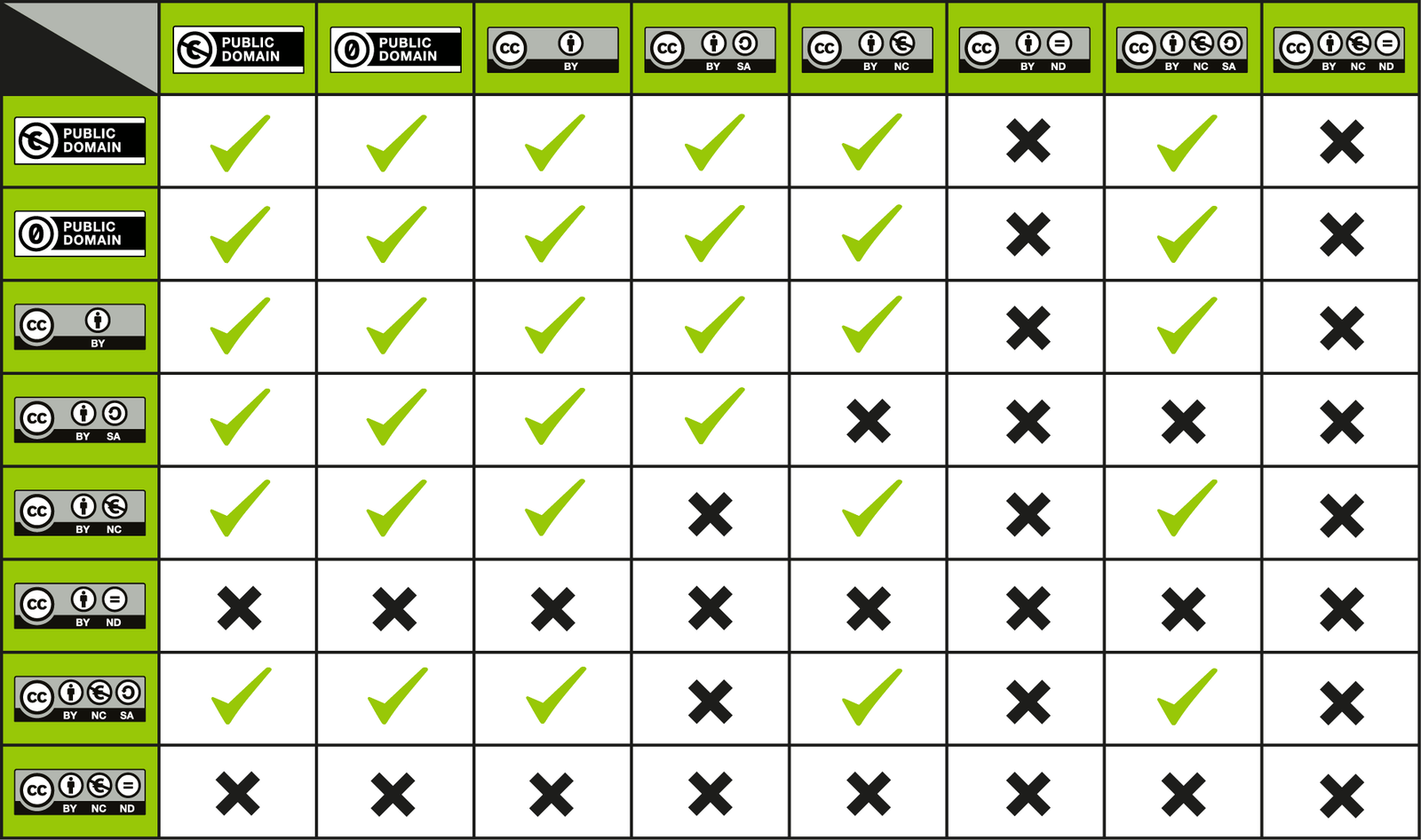
Licensing options and trade-offs (comparison)
| License / Approach | Pros | Cons | Use case |
|---|---|---|---|
| Copyright retained by author (no explicit license) | Protects author control | Limits sharing; requires permission | Authors who want control or commercial options |
| Creative Commons Attribution (CC BY) | Wide reuse; attribution required | Allows commercial use and adaptations | Open access community subtitles |
| CC BY-SA (share-alike) | Keeps derived works open | May complicate integration with other licenses | Communities that require openness |
| CC BY-NC (non-commercial) | Blocks commercial reuse without consent | Ambiguity about what’s “commercial” | Hobbyist and volunteer groups |
| Public domain dedication | Maximizes reuse | Irrevocable waiver in many places | For authors who want no restrictions |
Choose a license consistent with the original rights in the underlying audiovisual work: if the original rights holder retains exclusive control, a license from the subtitle author may not be enough to permit certain uses.
Hosting, distribution and platform considerations
- Platform rules matter: streaming services, subtitle repositories, and social platforms have different policies on derivative content and copyright claims. Review their terms before uploading.
- Metadata and searchability: include language codes, variant (e.g., “EN-US” vs “EN-GB”), and format (SRT/WebVTT) in filenames and hosting metadata for discoverability.
- Version control: use repositories (GitHub, GitLab) or subtitle platforms (e.g., Amara, if allowed) to track edits and contributors. These systems make it easier to show provenance in disputes.
For more on platform-ready practices, see our Streaming Guides and Apps & Tools sections.
Tips for crediting machine-generated and hybrid subtitles
- Transparency: clearly state if a subtitle is machine-generated, human-edited, or fully human-translated.
- Attribution: credit the human editor(s) even if output originated from a machine model.
- Quality notes: indicate whether the subtitle is a draft or has been reviewed.
Automated tools can speed work, but they do not remove the need to respect the underlying rights or to clearly label authorship and edits.
Practical checklist for uploading a subtitle file
- Confirm you have the right to upload (author permission or suitable license).
- Add an in-file attribution header or companion README.
- Name the file clearly: Title.Lang.Format.Version (e.g., “MovieTitle.EN-US.v1.srt”).
- On the hosting page, list author, date, license, source, and contact.
- Keep a changelog or contributors list for collaborative projects.
- Respond promptly to rights-holder requests and offer to remove or modify content.
FAQ
Q: Can I post subtitles for a movie I legally own on DVD?
A: Owning a copy of a film does not automatically grant the right to reproduce or distribute derivative works publicly. Personal use at home may be permitted, but public posting can implicate copyright in both the original work and the subtitle translation. Seek permission where public distribution is intended.
Q: Do I need to credit translator usernames from subtitle communities?
A: Yes. Respect community norms and the translator’s stated preferences. If the translator used a pseudonym, use that handle and link to the original page when possible.
Q: Are machine translations copyright-free?
A: Machine output may have unclear copyright status depending on jurisdiction. If a human editor made creative choices, that editor may have rights. Always label machine contribution and obtain permission before public distribution if the underlying work is copyrighted.
Q: Can I re-license a subtitle file under a different license?
A: Only if you hold all necessary rights (including consent from co-authors) and any license terms of earlier contributors permit relicensing. Respect moral rights where applicable.
Q: What do I do if a rights holder objects to my posted subtitle?
A: Respond promptly, verify the claim, and either provide proof of permission or remove the file. Retain records of communications. If you disagree with the notice, seek legal advice.
Where to learn more and additional resources
For authoritative guidance, consult official offices and standards in your region (copyright offices, communications regulators) and technical specs like WebVTT. Our Blog and Tech & Security sections also cover related best practices.
Conclusion
Posting subtitle files publicly can be legal and community-enhancing when handled transparently: verify authorship, use clear license statements, provide visible attribution, and keep provenance records. When in doubt, request permission or err on the side of restricting distribution until rights are clarified. These steps protect translators, respect original rights holders, and make subtitles more useful and trustworthy for viewers.
Disclosure: device settings, file-format support, and compatibility (e.g., how SRT or WebVTT metadata is handled) can differ by TV, player, operating system, region, and firmware version. Always verify current documentation for the specific devices and platforms you use.

Canzar
Ready to stream? Pick your plan
Live TV, movies, sports and 10,000+ channels on any device — Firestick, Android TV, Smart TV, phone.
View Subscription Plans Compare Pricing
Moderation: Comments are reviewed before publishing. Be respectful and on-topic.
Guidelines: Share streaming tips, device help, or content recommendations. No spam, no promotions, no off-topic links.