
Last updated August 25, 2026 · Editorially reviewed by CanzarTV
Subtitle authoring basics: timecodes, styles and deliverables for streaming platforms
Subtitles are more than a line of text on screen — they are an accessibility, localization and quality play. Whether you’re producing original content, preparing localized tracks, or sending masters to platforms, knowing the basics of timecodes, styling and deliverable formats reduces rework and playback issues.
This guide explains the common timecode formats, practical styling rules, the deliverable formats you’ll encounter (SRT, WebVTT, TTML/IMSC1, SCC/EBU STL and more) and a step-by-step authoring workflow you can use across streaming platforms. It’s intended for content creators, post-production teams, localizers and small studios in North America and Europe. Always confirm platform-specific requirements before final delivery.
Why subtitle authoring matters
Good subtitles help viewers follow dialogue, identify speakers and access content when audio is unavailable or in another language. Poor subtitles — incorrect timing, unreadable style, or wrong file format — can make content hard to watch and may break platform ingestion rules.
Core reasons to get subtitle authoring right:
- Accessibility and compliance: captions are essential for viewers who are deaf or hard of hearing and for regulatory requirements in some territories.
- Viewer experience: timing and readability affect comprehension more than small stylistic choices.
- Multi-platform delivery: different platforms accept different formats and styling rules; preparing proper upstream files saves time.
For platform-specific considerations and latest ingestion notes, see our Streaming Guides and tools roundups in Apps & Tools.
Key timecode formats and how to use them
Timecodes tell a player when to show and hide subtitle lines. Choosing the right timecode format is fundamental to sync and is often driven by the platform or delivery chain.
Common timecode styles
- SMPTE-style frame time (HH:MM:SS:FF): hours:minutes:seconds:frames. Widely used in post-production and when working with frame-accurate workflows. The interpretation of frames (and whether they’re “drop-frame”) depends on the frame rate.
- SRT timecodes (HH:MM:SS,mmm): hours:minutes:seconds,milliseconds. Used by many streaming platforms and basic editors.
- WebVTT timecodes (HH:MM:SS.mmm or H:MM:SS.mmm): similar to SRT but uses a dot for milliseconds and supports Web-specific metadata.
- TTML/IMSC and XML-based formats: timing may appear as clock-time (with seconds and fractional seconds) or frame-based time; TTML variants can also embed styling.
Drop-frame vs non-drop-frame
- Drop-frame timecode is a numbering convention used with certain frame rates (notably 29.97 fps) to keep timecode aligned with real elapsed time. It doesn’t drop actual frames; it skips frame numbers periodically. Use drop-frame only when the timeline and delivery spec require it.
Practical choice guidelines
- Check the deliverable spec first. Platforms often specify the accepted timecode style and required frame rate handling.
- Use frame-based timecodes when you need frame accuracy (e.g., tightly edited captions matched to cuts). Use millisecond timecodes for typical streaming captions.
- If you work from a video editorial timeline, export timecodes from your NLE or conform to the EDL/AAF/FCPXML that the platform ingest workflow expects.
Example timecode formats
- SRT: 00:01:12,500 –> 00:01:15,900
- WebVTT: 00:01:12.500 –> 00:01:15.900
- SMPTE frame: 01:00:00:12 (frame number in the last field)
Always validate exported files in a subtitle editor or player before sending.
Subtitle styling: legibility, placement and reading speed
Styling affects how easy subtitles are to read on different screens. Streaming platforms may strip or override style data, but you should still use consistent authoring rules.
Essential style rules
- Font and contrast: use a legible sans-serif font where possible; ensure strong contrast between text and background. Platforms will substitute fonts, so choose sizes and weights that read well even after substitution.
- Size and safe area: keep subtitles within the lower third safe area of the image and avoid placing text over essential on-screen action. Test on both 55″ TVs and mobile screens.
- Line length and lines: aim for maximum two lines on screen at a time. A common guideline is about 32 characters per line (including spaces) per line for comfortable reading on TVs, though some languages and platforms allow longer lines — confirm platform rules.
- Reading speed: pace subtitle on-screen time to viewer reading speeds. Many teams aim for an average reading speed roughly equivalent to 13–17 characters per second for comfortable comprehension. Adjust longer dialogues to multiple cues rather than very fast single lines.
- Speaker identification: use visual cues (positioning), speaker names, or parentheticals when needed. Avoid full uppercase for normal dialogue unless required for style.
- Punctuation and casing: use sentence case for most subtitles; use punctuation to match natural pauses and improve comprehension.
Styling support varies
- Basic formats (SRT) have no styling; players apply default styles.
- WebVTT supports basic styling blocks and positioning cues for HTML5 players.
- TTML/IMSC1 supports rich styling (font size, color, position) and is commonly used for platform-level styling control.
If you need consistent design across devices, supply a styled TTML/IMSC file and verify the platform honors the styling attributes.
Common subtitle deliverable formats and when to use them
From simple sidecar captions to broadcast-legal files, here’s a practical comparison.
| Format | Typical use | Styling support | Notes |
|---|---|---|---|
| SRT (.srt) | Quick sidecar for many streaming players and basic workflows | None (plain text) | Widely accepted; simple timecodes with milliseconds. Ideal for web and simple platforms. |
| WebVTT (.vtt) | Web/HTML5 players | Basic styling and positioning | Preferred for browser-based players; supports metadata and cue settings. |
| TTML / IMSC1 (.ttml, .xml) | OTT platforms, professional workflows | Rich styling and positioning | Industry-standard for styled captions and subtitles; used for multi-device delivery. |
| SCC / CEA-608/708 (.scc) | Broadcast and some distributor delivery | Limited styling (broadcast) | For closed captions destined for cable/broadcast in North America. Usually generated from subtitles. |
| EBU STL (.stl) | European broadcast and legacy workflows | Limited styling specific to EBU STL | Common in some European distribution chains. |
Note: There are many platform-specific variants and wrappers. Some services require burnt-in (open) subtitles for certain markets. Always confirm which formats and captions tracks (e.g., SDH/CC for accessibility) the platform wants.
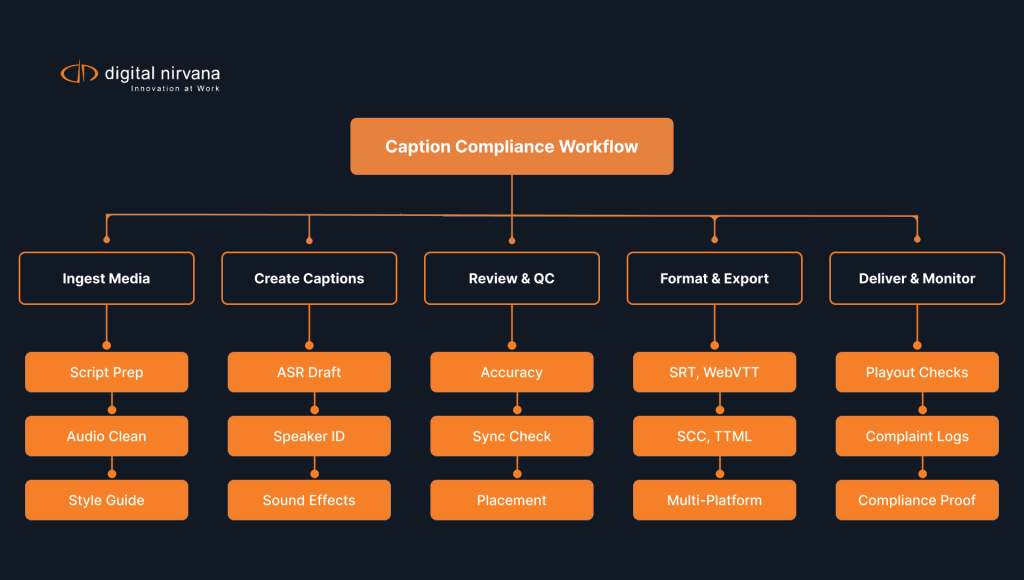
Practical authoring workflow (step-by-step)
A repeatable workflow reduces errors and accelerates delivery across multiple platforms.
- Prepare the master video and reference timecode
– Confirm the frame rate, start timecode, and whether timecode is drop-frame. Export a reference mezzanine or a low-res review file with embedded timecode burned in if needed. - Create a master subtitle file (frame-accurate or millisecond)
– Author to the editorial timeline, ensuring cues do not overlap and that each cue aligns to speech or meaningful audio changes. - Apply a style guide
– Use consistent rules for line length, speaker labeling, punctuation and non-speech elements (music, sound effects). Save a short style sheet to send with deliverables. - Localize (if needed)
– Provide translators with the master file (with timecodes). Use timing-preserving workflows to minimize retiming. - QC: automated and visual
– Run automated checks for overlapping cues, reading speed, character limits, illegal characters and bad line breaks. Do visual QC on a sample of scenes. - Convert to required formats
– Generate SRT, VTT, TTML/IMSC and any broadcast formats required by downstream platforms. Keep the master file as the single source of truth. - Platform device checks
– Test sidecar captions and burnt-in samples on target devices — web browsers, TV apps, streaming sticks and mobile devices. Look for truncation, font substitution and sync problems. - Deliver with metadata and notes
– Include language codes, description of styling, timecode origin, and a short QC report noting any unresolved items.
Tools to consider
- Subtitle editors and QC tools often support the formats above and include checks for overlaps, reading speed and format conversions. For tool recommendations and reviews, check our Apps & Tools pages and relevant Blog posts for hands-on notes.
QC checks and best practices
Automated checks
- Overlap and gap checks: no overlapping cues unless intentionally layered.
- Timecode format validation: ensure correct separators and millisecond/frame formats.
- Reading speed and cue length: flag overly long lines or high cps.
- Illegal characters and encoding: verify UTF-8 encoding and replace non-displayable glyphs.
Visual checks
- Segment sampling: review at least one minute per reel and scenes with fast dialogue, low contrast or heavy action.
- Device spot-checks: test on TV app, desktop browser, and a mobile device to surface platform-specific rendering issues.
Human checks
- Proofing: check translations for grammar, cultural accuracy and natural phrasing.
- Context checks: confirm speaker labels and non-speech descriptions (sound effects) are accurate and helpful.
QC log and versioning
Keep a short QC log that lists issues found and fixes made. Use versioned filenames and retain the master file to allow re-generation of sidecar formats quickly.
Packaging and delivery checklist
Before you hand files to a platform or distributor, verify the following items are included and correct:
- Master subtitle file (frame-accurate or millisecond) used as the source of truth.
- Sidecar files in requested formats (e.g., .srt, .vtt, .ttml/.xml). If the platform requires broadcast formats, include .scc or .stl as requested.
- Language metadata (IETF language tags like en, en-GB, fr).
- A short style guide or readable notes (speaker conventions, any deliberate deviations).
- QC report summary and version number.
- Optional: burnt-in subtitle sample if the platform asked for open captions.
Confirm file naming conventions with the receiving platform and include checksums if requested.
Frequently asked questions (FAQ)
Q: Which subtitle format should I deliver for streaming?
A: Start by checking the platform’s delivery spec. Web platforms often accept SRT or WebVTT for simple captions and TTML/IMSC1 for styled tracks. Many OTT distributors prefer TTML/IMSC1 for multi-device consistency. When in doubt, provide the platform’s preferred format plus a universal SRT as a fallback.
Q: How long should each subtitle stay on screen?
A: Keep cues long enough for comfortable reading. A practical range is to pace cues so that reading speed averages within comfortable limits (often cited as roughly 13–17 characters per second), but adjust for scene context. Avoid very short-lived cues unless they mirror quick dialogue that is easy to read.
Q: How many characters per line are acceptable?
A: Many teams use about 32 characters per line for TV; mobile screens may allow shorter lines. Confirm platform limits and language-specific needs (some languages naturally use more characters).
Q: What is the difference between open captions and closed captions?
A: Open captions are burned into the video and cannot be turned off. Closed captions are sidecar files or streams the viewer can enable or disable. Accessibility requirements sometimes dictate closed captions for compliance; distribution deals sometimes request open captions for specific markets.
Q: Do I need a separate file for SDH (subtitles for the deaf and hard of hearing)?
A: SDH often requires additional information beyond dialogue, such as speaker identification and non-speech sounds. If the platform has a separate SDH track requirement, deliver a version that includes those elements.
Conclusion
Subtitle authoring is a mix of technical discipline and editorial craft. Follow a single-source workflow (maintain one master file), respect timecode accuracy, apply consistent styling for legibility, and generate platform-specific deliverables only after a robust QC pass. These steps reduce rework and improve viewer experience across devices.
For platform-specific notes and deeper tool coverage, see our Streaming Guides and the Apps & Tools pages. You can also find practical tips and case studies in recent posts on our Blog.
Disclosure: Device and platform subtitle behavior, supported formats and styling compatibility vary by TV, device, operating system, region and firmware version. Always verify with the receiving platform or device manufacturer documentation before final delivery.

Canzar
Ready to stream? Pick your plan
Live TV, movies, sports and 10,000+ channels on any device — Firestick, Android TV, Smart TV, phone.
View Subscription Plans Compare Pricing
Moderation: Comments are reviewed before publishing. Be respectful and on-topic.
Guidelines: Share streaming tips, device help, or content recommendations. No spam, no promotions, no off-topic links.