
Last updated August 27, 2026 · Editorially reviewed by CanzarTV
How HDR Affects Perception of VFX and CGI in Streaming Series
High dynamic range (HDR) is one of the most visible picture-quality upgrades in streaming over the past decade. While it promises deeper contrast, brighter highlights, and richer color, HDR also changes the way viewers perceive visual effects (VFX) and computer-generated imagery (CGI). That matters for showrunners, VFX artists, colorists, and fans who want consistent, believable on-screen visuals. This article explains how HDR affects VFX perception, practical steps for creators and viewers, a comparison of SDR vs HDR effects, and a helpful FAQ.
Why HDR changes perception: a quick primer
HDR expands the range of luminance and color compared with standard dynamic range (SDR). In practice that means:
- Brighter specular highlights (sun glints, reflections) without clipping across HDR-capable displays.
- Deeper shadow detail in many scenes, depending on display capabilities and mastering choices.
- A wider color gamut and more saturated hues, when content is graded for it.
All of the above alter the cues viewers use to judge realism: contrast, highlight behavior, edge detail, and color balance. VFX and CGI are built from pixels meant to match captured footage, so when the underlying display characteristics change, previously “invisible” mismatches can become visible.
How HDR commonly affects specific VFX/CGI elements
Specular highlights and reflections
Specular highlights often appear more pronounced in HDR. On SDR they can be compressed or clipped; HDR can reveal highlight roll-off, small bright points (reflections on wet pavement, metal), and lens-like artifacts. That can improve realism, but it also exposes integration issues—CG reflections that were tuned for SDR may look too strong or unnaturally sharp in HDR.
Bloom, glow, and lens effects
Bloom and glow are intended to mimic how bright sources scatter in optics. In HDR these blooms can look more intense if not tuned for the expanded luminance range. Overly aggressive bloom that looked subtle in SDR may read as glare or flare in HDR.
Color saturation and skin tones
Wider color gamuts make saturated elements more vivid. Costume and set colors tuned for SDR can suddenly look oversaturated in HDR if grading isn’t adjusted. Skin tones are especially sensitive; small hue or saturation differences become more noticeable, and viewers may perceive faces as “off” even when geometry and motion are correct.
Edge detail, matte lines, and compositing seams
HDR increases perceived sharpness in highlights and midtones. That can make matte lines, haloing, or edge fringing more obvious when CGI is composited over plates. Subtle edge blending that passed on SDR may fail in HDR unless reworked.
Depth cues and atmospheric effects
HDR can change how depth is perceived because it alters relative contrast between foreground and background. Atmospheric effects (fog, volumetric light) that relied on limited dynamic range to hide CG depth errors may reveal inconsistencies in HDR.
Film grain and texture
Grain and noise often behave differently under HDR grading. Film grain added to unify plates and renders may look denser or grainier in bright regions, requiring careful rebalancing or different grain profiles for HDR masters.
Why some HDR streams look “better” or “worse” than expected
Several production and delivery decisions affect how HDR content plays back:
- Mastering intent: Was the program graded and mastered natively in HDR or upconverted from an SDR master? Native HDR masters usually retain intent; upconverted HDR can magnify problems.
- Target display assumptions: Colorists typically grade assuming a target mastering display (peak brightness and gamut). Different TV models and streaming devices map HDR signals differently, which affects final appearance.
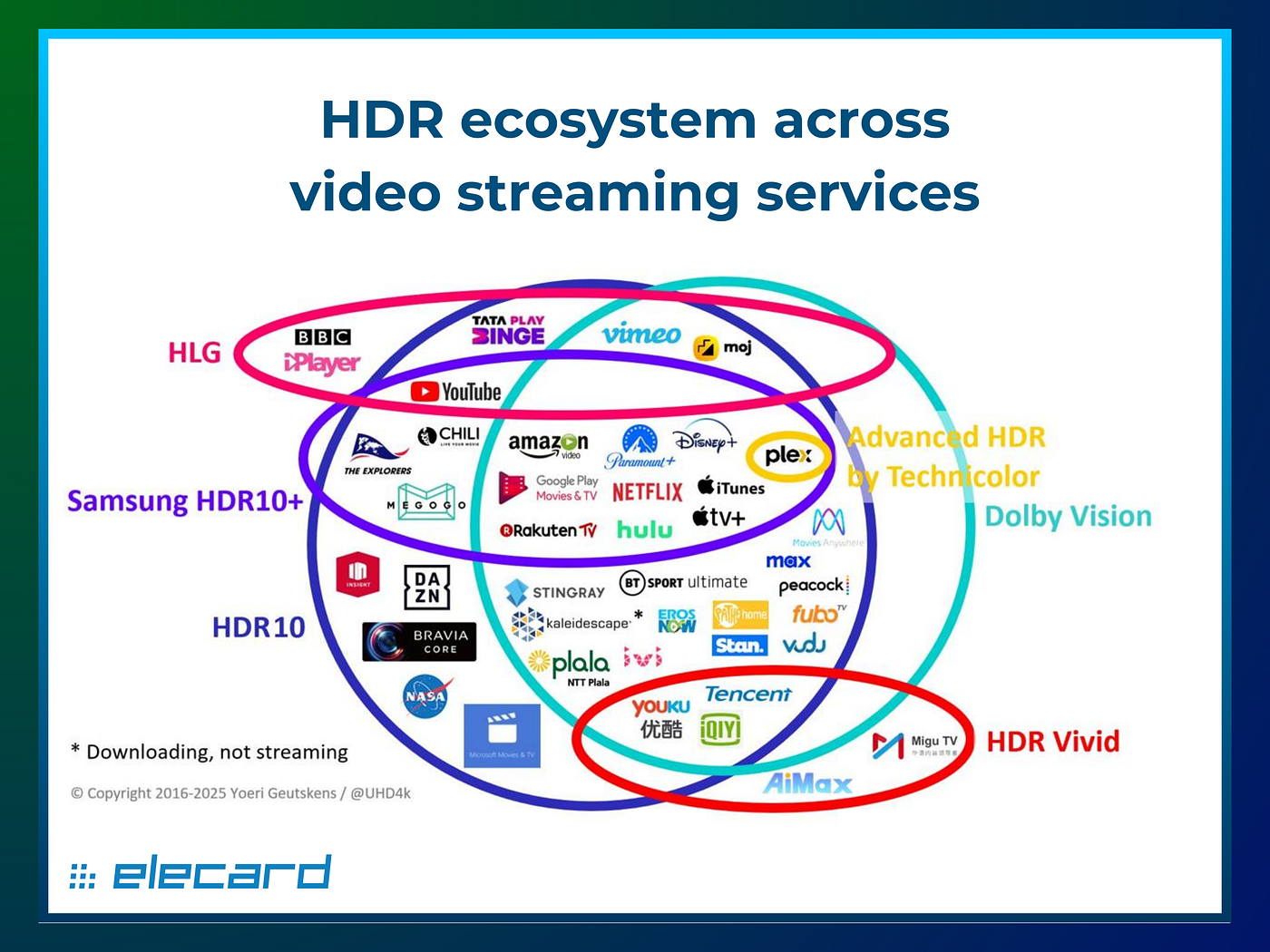
- Metadata and tone mapping: Formats such as HDR10 and Dolby Vision can include metadata to guide tone mapping. Not all devices use the same mapping strategy, so highlights and shadows can be handled differently across TVs.
- Compression and streaming bandwidth: Bit-rate and codec decisions influence fine detail and banding. HDR’s larger color and luminance ranges need more data to avoid artifacts.
Because of these variables, HDR can either enhance realism when properly handled or amplify integration issues that were hidden under SDR.
Practical steps for creators (VFX artists, colorists, post houses)
Below are workflow suggestions to reduce surprises when delivering HDR-aware VFX for streaming series.
- Aim for native HDR workflows when possible
- Work in a color-managed pipeline that supports HDR and a wide color gamut (for example, ACES or similar systems). Avoid treating HDR as a post-process upconvert from SDR.
- Review VFX plates and passes on calibrated HDR displays
- Check composites and renders on more than one HDR display if possible (different tone-mapping behaviors help reveal issues). Verify how speculars, bloom, and reflections behave across bright and dark scenes.
- Render HDR-aware passes
- Produce separate HDR passes for elements with bright emission (glows, fire, screens) and control them in compositing rather than relying on global lifts.
- Use scene-referred workflows and filmic tone-mapping
- Treat renders as scene-referred data where a tone-mapper determines final appearance. This helps preserve detail across exposure changes.
- Re-evaluate film grain, anti-aliasing, and edge blending
- Grain profiles and AA settings that looked fine in SDR may need adjustment. Use higher-quality antialiasing and careful matting to reduce edge artifacts exposed by HDR.
- Include HDR QC passes in your pipeline
- Add dedicated QC steps for HDR: highlight clipping checks, false color inspections, and viewing on consumer devices as well as studio monitors.
- Deliver appropriate masters and metadata
- Provide the platform with the requested master(s) and any required HDR metadata. Platforms often publish delivery specs—verify them and include test clips if necessary.
- Communicate with the colorist early
- VFX, DI colorists, and editorial should collaborate so that visual effects are graded in context. Early shared references reduce late-stage surprises.
Practical steps for viewers who want accurate HDR playback
If you’re a viewer noticing that effects look “off” in HDR, here are steps to improve playback fidelity on your TV or streaming device:
- Use the TV’s calibrated or “Filmmaker”/”Cinema” HDR mode
- Most TVs include picture modes intended for accurate reproduction. These modes typically disable aggressive sharpening, dynamic contrast, and extreme color enhancements.
- Disable “dynamic” picture processing
- Features that boost contrast or motion smoothing can change VFX appearance. Turn off dynamic contrast, motion interpolation, and aggressive local contrast enhancements when you want faithful reproduction.
- Verify the streaming app is delivering HDR
- Some apps and devices switch between SDR and HDR depending on bandwidth and device support. Use the app’s settings or OSD info to confirm HDR playback if available.
- Test on another HDR-capable display or device
- If possible, compare playback on a different TV or a connected HDR monitor. This helps determine whether the issue is source-related or device-specific.
- Keep device firmware and app versions up to date
- Manufacturers and streaming apps sometimes update HDR handling. Check release notes and vendor documentation for improvements or known issues.
For step-by-step setup guidance, see our Devices & Setup and Streaming Guides pages.
SDR vs HDR: How VFX elements typically behave (comparison table)
| VFX Element | Typical SDR Behavior | Typical HDR Behavior | Practical note |
|---|---|---|---|
| Specular highlights | Can clip or appear flat | Show more brightness detail and sharper points | Render highlights with headroom and separate highlight passes |
| Bloom/glow | Softer, less intense | More pronounced, can become glare | Tune bloom strength for HDR masters |
| Color saturation | More restrained | More vivid; risk of oversaturation | Re-check costumes/props under HDR grading |
| Edge matte | May hide seam artifacts | Seams and halos become clearer | Improve keying/matting and use higher-res masks |
| Atmospheric depth | Contrast-limited depth cues | Stronger depth contrast but may reveal CG layering | Adjust volumetric scattering and depth compositing |
| Grain/noise | Less visible in highlights | Grain can be more apparent in bright areas | Use HDR-appropriate grain profiles |
Workflow checklist for showrunners and post supervisors
- Confirm whether the series will be graded and mastered in HDR natively.
- Specify target HDR format(s) in delivery specs and confirm platform requirements.
- Schedule HDR-specific QC and viewing sessions on representative consumer displays.
- Request VFX deliverables with HDR-aware passes and clear documentation for grading.
- Maintain a color-managed pipeline from rendering to final conform.
FAQ
Q: Will all HDR TVs display VFX the same way?
A: No. HDR displays use different tone mapping and peak luminance handling. Results can vary between manufacturers, models, and even by firmware revision. If precise appearance is critical, test on multiple representative displays and tell viewers that looks may differ.
Q: If a show was graded in SDR, can it still look good in HDR?
A: It can, but converting an SDR master to HDR is less reliable than grading natively in HDR. Upconversion often requires additional adjustments to highlights, saturation, and grain to avoid amplified issues.
Q: Are some VFX techniques more HDR-friendly than others?
A: Techniques that separate high-intensity effects into dedicated passes (emissives, bloom, specular) are generally more HDR-friendly because they allow finer control during grading and tone mapping.
Q: I notice “banding” or weird artifacts in HDR. Is that normal?
A: Banding can appear if the encoder bitrate is too low or if the HDR master has steep gradients without adequate dithering. Streaming platforms manage bandwidth differently; if you see artifacts across multiple titles, check app updates and device settings.
Q: Can viewers “fix” VFX that look wrong in HDR?
A: Viewers can often improve perception by switching to accurate picture modes (Cinema/Filmmaker), disabling aggressive processing, and ensuring the streaming app and device support HDR. However, issues rooted in production or mastering need fixes in post.
Conclusion
HDR expands the toolkit for expressive, lifelike images, but with that power comes responsibility: it also exposes VFX and CGI integration issues that could be subtle or hidden in SDR. For creators, the safest path is a color-managed, scene-referred HDR workflow with dedicated HDR passes and QC on multiple displays. For viewers, selecting accurate picture modes and keeping devices up to date reduces playback surprises.
Disclosure: Settings and compatibility can differ by TV, device, operating system, region, and firmware version. Verify current manufacturer documentation and streaming platform delivery specs for the most accurate guidance.
For related tutorials on setup and device choices, consult our Devices & Setup and Streaming Guides sections. You may also find practical tools and apps for verification on our Apps & Tools page.

Canzar
Ready to stream? Pick your plan
Live TV, movies, sports and 10,000+ channels on any device — Firestick, Android TV, Smart TV, phone.
View Subscription Plans Compare Pricing
Moderation: Comments are reviewed before publishing. Be respectful and on-topic.
Guidelines: Share streaming tips, device help, or content recommendations. No spam, no promotions, no off-topic links.