
Last updated August 27, 2026 · Editorially reviewed by CanzarTV
How Dolby Atmos and Object-Based Audio Change the Home Viewing Experience
A shift in how sound is authored and delivered is changing the way we experience TV shows, movies, and streamed concerts at home. Dolby Atmos and other object-based audio systems move beyond traditional channel-based mixes to place sound as “objects” in three-dimensional space. That can mean more convincing spatial cues, a better sense of height, and potentially clearer dialogue — but results depend on the content, your playback equipment, and the room. This guide explains what object-based audio is, how Dolby Atmos affects the home viewing experience, practical setup steps, and what to expect compared with stereo and conventional surround.
What is object-based audio and how does Dolby Atmos fit in?
Object-based audio treats sounds as individual objects with metadata describing their position and movement in three-dimensional space, rather than assigning them to fixed channels (left, right, center, surround). During playback, the rendering engine maps those objects to your speaker layout — whether that’s a full surround system, a soundbar with upward-firing drivers, or headphones using virtualization.
Dolby Atmos is a widely used implementation of object-based audio. It supports both discrete channels and objects so content creators can combine traditional channel beds with positional objects to craft immersive mixes. Many streaming services, UHD Blu-rays, and gaming platforms now provide Atmos-coded tracks, but availability varies by title and region.
How object-based audio changes the home viewing experience
- Improved spatial accuracy: Sounds can be placed overhead and moved smoothly around the listening area, creating a stronger sense of space and realism.
- Flexible rendering: The same Atmos mix can adapt to many speaker configurations, from full 7.1.4 rigs to 3.1.2 soundbars or headphones with head-tracking virtualization.
- Potentially clearer dialogue: Mixing engineers can treat dialogue as separate objects or use metadata to prioritize clarity, which can help when the renderer optimizes for the listener’s setup. However, dialogue clarity also depends on the mix, loudness normalization, and the playback system.
- Enhanced immersion for HDR movies and high-end productions: When paired with high-quality video (HDR), object-based audio can strengthen the overall cinematic experience.
Bear in mind that the degree of improvement depends on the source mix, your hardware, and room acoustics. Always verify support and settings for your specific TV, receiver, or streaming device.
Atmos vs. stereo and channel-based surround (comparison)
| Aspect | Stereo | Channel-based surround (e.g., 5.1) | Object-based audio (Dolby Atmos) |
|---|---|---|---|
| Sound placement | Limited to left/right imaging | Uses fixed surround channels for wrap | Objects can be positioned anywhere, including overhead |
| Adaptability to speaker setups | Low | Medium — fixed channel mapping | High — renderer adapts to available speakers |
| Perceived immersion | Moderate | Higher than stereo | Highest in many cases thanks to height cues and precision |
| Dialogue clarity | Varies; often centered | Center channel dedicated to dialogue | Can be very clear if mixed as objects or prioritized by renderer |
| Complexity & cost | Low | Medium | Can be higher depending on playback system |
This table shows general tendencies; actual outcomes vary with content, mixing choices, and playback equipment.
Will Atmos make dialogue clearer than stereo? (Atmos vs stereo dialogue clarity)
Object-based mixes provide tools that can help dialogue stand out — for example, placing voice objects centrally and using metadata to maintain level consistency across renderers. In practice, though, dialogue clarity gains aren’t guaranteed. Factors that influence clarity include:
- The original mix: Some films and shows already bury dialogue under effects or music; Atmos won’t fix a poor mix.
- Loudness normalization and dynamic range: Different services and devices apply processing that can change perceived clarity.
- Your playback chain: A dedicated center speaker or a soundbar with a clear vocal channel may reproduce dialogue better than a compact TV speaker.
- Room acoustics and speaker placement: Reflections and reverberation affect intelligibility.
If dialogue is a priority, look for content mixed with clear vocal placement, consider a soundbar or AVR with a strong center voice, and use device features like “dialogue enhancement” or night modes that some manufacturers include. Verify current manufacturer documentation for exact features on your model.
What you need for Dolby Atmos at home
A typical checklist for hearing Atmos at home:
- Atmos-compatible content: Look for titles labeled Dolby Atmos on your streaming app, Ultra HD Blu-ray packaging, or game settings.
- A playback device that passes or decodes Atmos: Many streaming boxes, smart TVs, game consoles, and Blu-ray players support Atmos pass-through or decoding, but capabilities vary by model and firmware.
- An Atmos-capable audio system or speaker setup: Options range from AV receivers with height speakers, dedicated height modules, up-firing speakers/soundbars, or headphones with Atmos virtualization. If you’re using a soundbar or TV speakers, it might rely on virtualization or reflections.
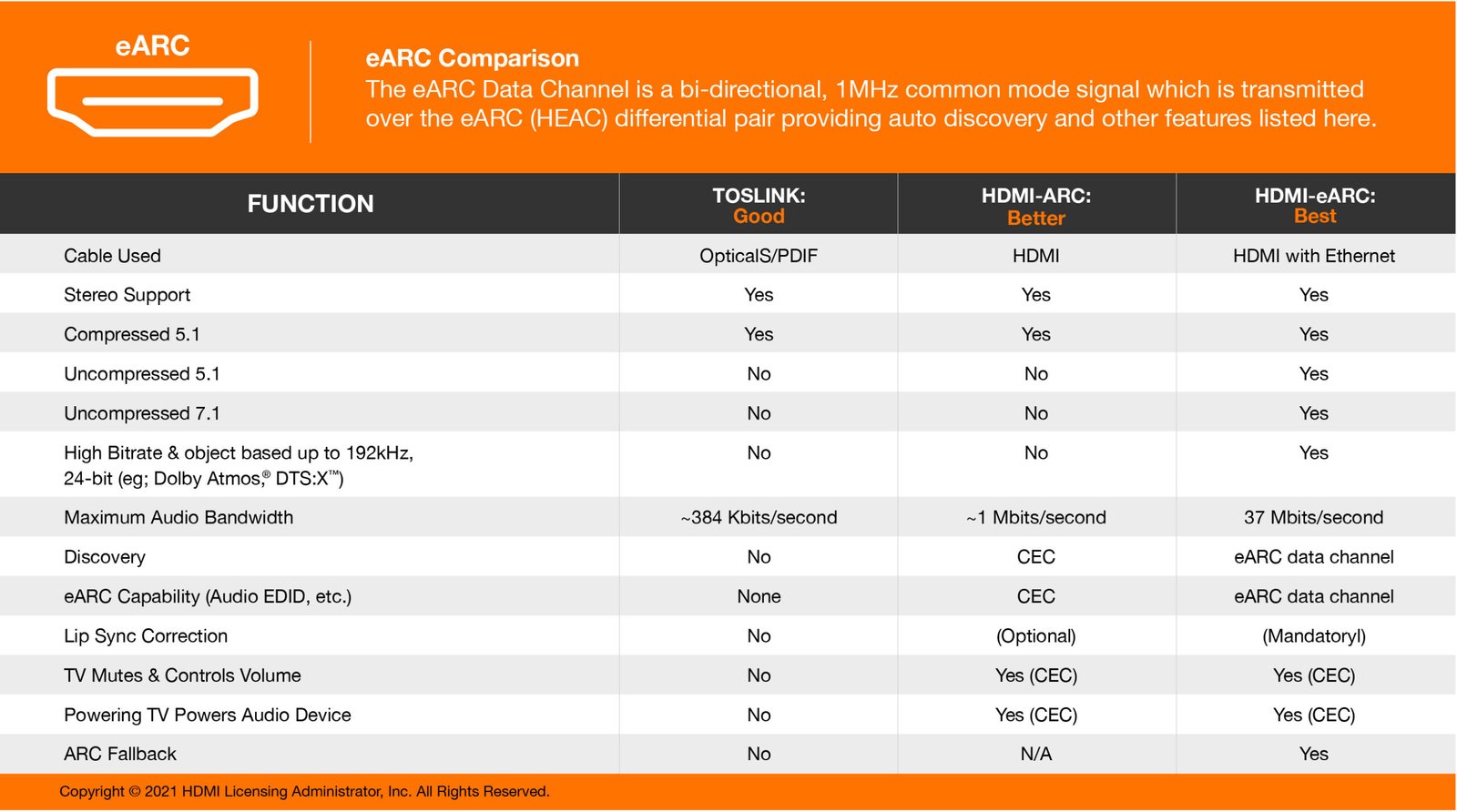
- Proper connections: For the best fidelity, use HDMI with eARC (or ARC in some setups) to pass object-based audio from a TV to an AV receiver or soundbar. Support varies between devices; check current specs.
- Correct device settings: Enable bitstream passthrough or Atmos output in your streaming device or player, and ensure your AVR or soundbar is configured to accept Atmos streams.
Because compatibility and labels can differ by region and model, check the manufacturer documentation and the streaming service’s support pages for the most accurate guidance.
Step-by-step: How to set up Dolby Atmos for streaming movies and TV
- Confirm the content: Within your streaming app (Netflix, Apple TV+, Prime Video, Disney+, etc.), look for the Dolby Atmos badge on a title’s details page. Not all titles have Atmos even on services that support it.
- Check your playback chain: Identify whether your TV, streaming stick/set-top box, or game console will act as the source. Decide whether the device will pass Atmos to a receiver/soundbar or decode locally.
- Use HDMI eARC when possible: If your TV is between the streaming device and receiver/soundbar, use HDMI eARC to pass full-resolution Atmos streams. Note: exact behavior depends on TV and AVR firmware.
- Configure audio output: On your streaming device, set audio output to Dolby Atmos or bitstream passthrough if the option exists. On AVRs/soundbars, enable Atmos or set speaker configuration to include height channels if applicable.
- Calibrate speakers: Run automatic room EQ on your AVR/soundbar if provided, and check placement recommendations for height channels or up-firing speakers.
- Test with known Atmos content: Play a title that explicitly lists Dolby Atmos. Some devices provide test tones or demo clips; others have Atmos-enabled trailers.
- Troubleshoot common issues: If Atmos isn’t available, confirm the streaming subscription tier supports Atmos, ensure the app/device firmware is current, and that HDMI cables and ports support eARC/ARC as required.
If any step is unclear for your exact model, verify details with manufacturer support and streaming service help pages.
Playback options and differences
- Soundbar with Atmos virtualization: Easiest to install and often the most compact solution. Up-firing drivers use reflections to simulate height, which works best when the room supports those reflections. Performance varies by room and unit.
- AV receiver with dedicated height speakers: Offers the most precise rendering when properly installed and calibrated. This setup scales up in cost and complexity but yields strong object placement.
- Headphones and virtualization: Many platforms can render Atmos for headphones or mobile devices using binaural processing. This can produce convincing spatial cues but depends on the virtualization algorithm and headphone profile.
Check the documentation for each device to confirm which workflows it supports (decoding vs. passthrough, HDMI port requirements, firmware dependencies).
Practical tips to get the most out of immersive audio
- Prioritize source quality: Atmos on low-bitrate streams may not deliver the same impact as high-quality UHD Blu-ray or high-bitrate streams.
- Keep firmware updated: Manufacturers update audio handling and passthrough behavior; updates can change compatibility.
- Mind the room: Reflective surfaces and speaker placement affect how well up-firing drivers and height speakers perform.
- Use calibration tools: Automatic room calibration built into many AV receivers and soundbars helps render objects accurately for your space.
- Check streaming settings: Some apps let you choose audio quality or toggle surround features. Also verify subscription tiers — some platforms reserve Atmos for higher tiers or certain device families.
Do streaming services all treat Atmos the same way?
No. Services vary in how they encode, label, and make Atmos content available. Some platforms offer Atmos for select titles only; others may include it broadly. Also, regional catalogs differ. Always check the title page and the service’s help pages for specifics.
For more on streaming app behavior and device compatibility, see our Streaming Guides and Apps & Tools pages for platform-specific tips.
FAQ
Q: Will I notice a difference if I only have a TV’s built-in speakers?
A: Most built-in TV speakers are limited and won’t reproduce height cues or wide soundstage like a soundbar or surround system. Some TVs offer virtual surround processing that can improve perceived spaciousness, but for true Atmos effects you’ll get better results with an external sound system.
Q: Can I get Atmos on headphones?
A: Yes — several devices and services support Atmos for headphones using binaural rendering. This provides spatial cues through standard stereo headphones, though the experience differs from loudspeaker-based systems.
Q: Does Atmos require special HDMI cables?
A: For full object-based audio passthrough, using HDMI with eARC support is commonly recommended. HDMI cable categories (High Speed, Premium High Speed, Ultra High Speed) matter for bandwidth; check your device documentation rather than relying on one-size-fits-all claims.
Q: Is Atmos always better than stereo?
A: “Better” depends on goals. Atmos can be more immersive and spatially precise. For simple, dialogue-focused listening or two-speaker setups, a well-mixed stereo track may be entirely satisfactory. The best choice depends on content and the listening environment.
Q: My streaming app shows Atmos but I don’t hear it — what should I check?
A: Verify device audio settings, HDMI connections (eARC), receiver/soundbar configuration, and whether the title truly includes an Atmos track. Firmware updates and region-specific restrictions can also affect availability.
Conclusion
Dolby Atmos and object-based audio bring new creative tools for sound designers and new possibilities for home viewers: more realistic placement of effects, an added sense of height, and flexible rendering across devices. The real-world benefits depend heavily on content quality, your audio hardware, room acoustics, and correct configuration. For the best experience, choose reliable Atmos-enabled content, confirm device compatibility, use HDMI with eARC where needed, and run speaker calibration.
If you’re exploring upgrades, start with a capable soundbar or an AV receiver with height channels, and check our Devices & Setup guides for hardware suggestions and setup insights. For platform-specific tips and app behavior, visit our Streaming Guides and Apps & Tools sections.
Disclosure: Settings, feature names, and compatibility can differ by TV, streaming device, AV receiver, soundbar, operating system, region, and firmware version. Verify current manufacturer documentation and streaming-service support pages for your exact equipment and region.

Canzar
Ready to stream? Pick your plan
Live TV, movies, sports and 10,000+ channels on any device — Firestick, Android TV, Smart TV, phone.
View Subscription Plans Compare Pricing
Moderation: Comments are reviewed before publishing. Be respectful and on-topic.
Guidelines: Share streaming tips, device help, or content recommendations. No spam, no promotions, no off-topic links.