
Last updated August 27, 2026 · Editorially reviewed by CanzarTV
How HDR Affects File Sizes and Bandwidth for Uploaders and Streamers
Introduction
High dynamic range (HDR) video is increasingly common in creator workflows because it preserves brighter highlights, deeper shadows, and a wider color gamut than standard dynamic range (SDR). For uploaders, streamers, and small studios, HDR also changes practical considerations: file sizes, encoding choices, storage budgets, and upload or live-stream bandwidth needs. This guide explains why HDR typically increases data requirements, how that affects live and on‑demand delivery, and practical steps you can take to manage costs and quality without relying on any particular product claim. Wherever behavior differs by device, platform, or firmware, verify current manufacturer or platform documentation.
Why HDR typically increases file size and encoding complexity
H2: The core technical reasons
H3: Higher color depth
HDR workflows commonly use 10‑bit color (or higher) instead of the 8‑bit depth used by many SDR productions. More bits per pixel mean more raw data for the same resolution and frame rate. The result: larger source files and higher demands on the encoder.
H3: Wider color gamut and different primaries
HDR content often uses wider color gamuts (for example, Rec. 2020 or DCI‑P3) and different transfer functions (PQ and HLG). Encoding and storing a larger color gamut while preserving color accuracy requires more bits in the signal path to avoid banding and posterization.
H3: HDR metadata and mastering info
HDR formats rely on metadata (static or dynamic) that describes luminance, color mapping, and mastering display characteristics. Metadata adds some overhead to packaged files and must be preserved through encoding and packaging to enable correct playback on compatible devices.
H3: Perceptual demands increase bitrate needs
Because HDR exposes more detail in very bright and very dark areas, viewers more easily notice compression artifacts that would be hidden in SDR. To maintain similar perceptual quality, encoders generally need higher bitrates or more efficient codecs.
H3: Why chroma subsampling and compression matter
HDR workflows frequently keep chroma formats and quantization settings conservative to avoid color artifacts. While many streaming workflows use 4:2:0 chroma subsampling, how you apply it and at what bit depth matters more with HDR.
H2: How HDR changes streaming bandwidth needs
H3: Live streaming vs. VOD (on‑demand) differences
- VOD allows multi‑pass encoding, long transcode times, and extensive ABR (adaptive bitrate) ladder preparation. You can generate SDR and HDR variants and hand‑tune each rung of the ladder.
- Live streaming has real‑time constraints. Hardware encoders and low‑latency pipelines may limit bitrate and codec options. That can force tradeoffs between HDR fidelity and stream stability.
H3: Bitrate ladders and adaptive streaming
Adaptive streaming (HLS/DASH) delivers multiple encoded representations so viewers receive the best match for their connection. With HDR, you may need to shift each rung upward in bitrate or add intermediate steps, because HDR representations often need more bits for the same perceived quality as their SDR counterparts.
H3: Codec efficiency matters more with HDR
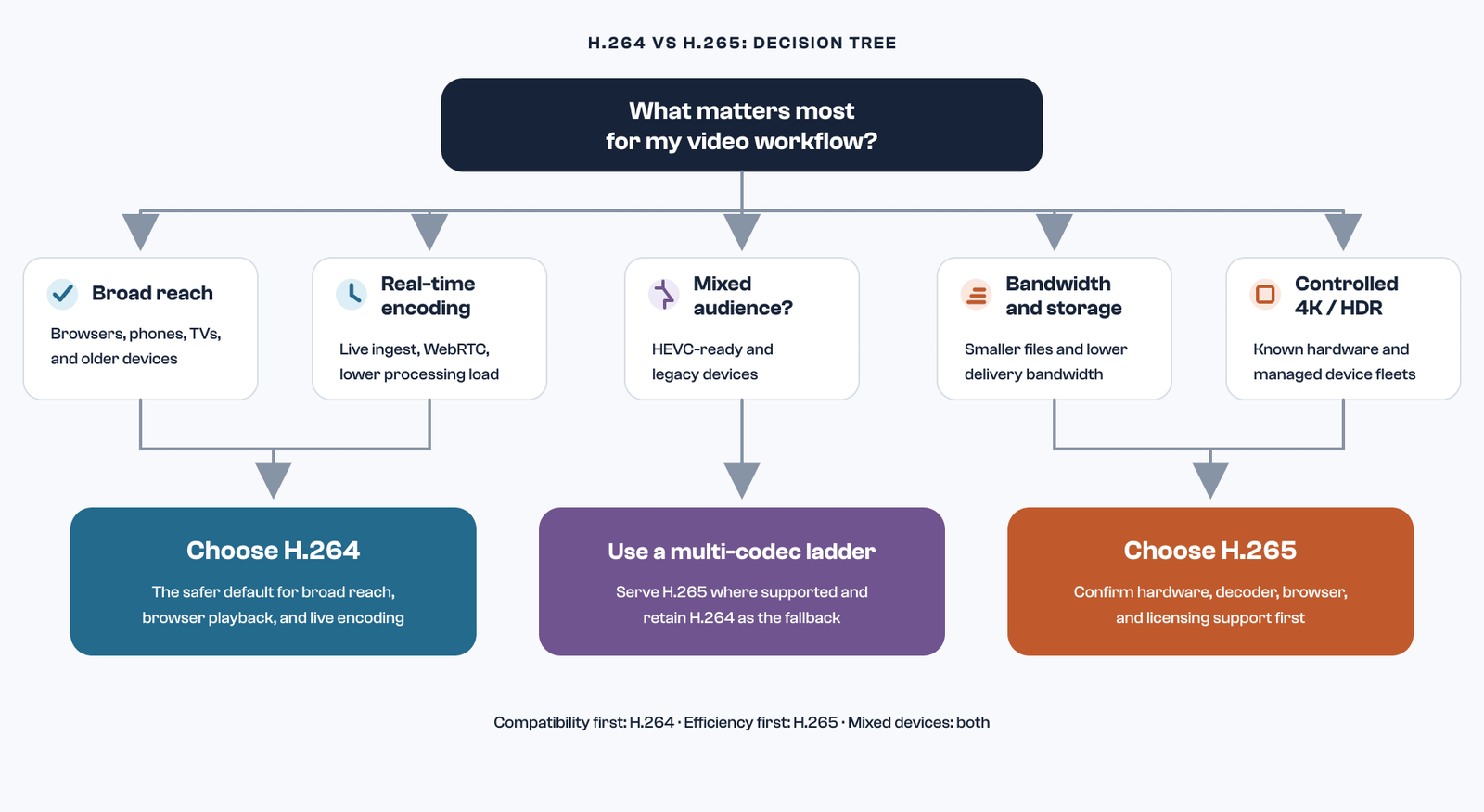
Modern, efficient codecs (HEVC/H.265, AV1, and newer) can reduce the incremental bitrate penalty of HDR compared with older codecs. However, device and platform decoder support varies; not every viewer device supports every codec or HDR flavor. Choose codec and transcode strategies based on your audience and distribution targets.
H3: A conservative comparison table
Below is a high‑level comparison to illustrate relative considerations. These are general tendencies, not guaranteed values—verify with your encoder, CDN, and platform documentation.
| Concern | SDR baseline | What changes with HDR |
|---|---|---|
| Perceptual bitrate needed | 1.0× baseline | Often 1.1×–1.5× relative to SDR (depends on codec and scene complexity) |
| Source file size | Baseline | Larger when using 10‑bit masters and wide gamut (mezzanine formats increase size) |
| Encoding time (VOD) | Baseline | May increase due to higher precision and optional dynamic metadata handling |
| Live bandwidth sensitivity | Baseline | More sensitive — make conservative ABR rungs and test in real conditions |
Note: percentages above are typical ranges reported by practitioners in many workflows but vary by codec, content type, and encoder settings.
H2: Storage and upload planning for HDR assets
H3: Master archives vs delivery copies
Keep a mezzanine master (higher bitrate, higher bit depth) for archiving and long‑term reprocessing. Delivery copies should be transcodes: optimized, bitrate‑tuned variants tailored to each platform. Storing HDR masters will increase your archive storage needs; you should budget accordingly.
H3: Uploading large masters — practical tips
- Use resumable upload tools or managed upload clients to avoid restarting large transfers.
- Consider uploading mezzanine files during off‑peak hours or with a dedicated connection to avoid contention with live broadcasts.
- If you outsource transcoding to a cloud or platform, upload a single high‑quality master and let the service generate ABR renditions to reduce repeated uploads.
H3: Cost considerations: storage and egress
More bytes mean higher storage costs and higher egress charges when you deliver content from cloud providers or CDNs. Plan for both archive storage of HDR masters and the increased CDN bandwidth for HDR viewers.
H2: Practical steps for streamers and uploaders
H3: 1) Verify platform and device HDR support
Before committing: check whether the platform (VOD service or live platform) supports your HDR flavor (HDR10, HLG, Dolby Vision). Device support (TVs, streaming sticks, phones) varies by model and firmware, so test on target devices.
H3: 2) Choose codecs and containers with both compatibility and efficiency in mind
- For broad compatibility, many services accept HEVC or VP9/AV1 for HDR, but decode support differs by device. Containers (MP4, MKV, CMAF for ABR) also influence metadata handling.
- When in doubt, follow the platform’s recommended delivery specs. If you have a professional distribution partner, ask which mezzanine formats they prefer.
H3: 3) Preserve and embed appropriate metadata
Include static or dynamic HDR metadata as required by your target workflow. Missing or incorrect metadata can cause incorrect tone mapping on playback devices.
H3: 4) Build an HDR‑aware bitrate ladder
Create ABR renditions with slightly higher bitrates or additional rungs compared with SDR. Test with representative scenes (bright highlights, dark shadows, high motion) to ensure the ladder performs in real conditions.
H3: 5) Have an SDR fallback or tone‑mapping path
Not every viewer has HDR playback capability. Provide an SDR version or rely on platform down‑conversion/tone‑mapping so SDR viewers still get a good experience.
H3: 6) Use hardware acceleration where appropriate
For live streaming, hardware encoders and GPUs can reduce CPU load and latency. Confirm that hardware encoders preserve required HDR metadata and color depth for your pipeline.
H3: 7) Test on real networks
Test under different upload speeds and fluctuating conditions. Live encoding settings that look fine on a wired gigabit might stutter on a typical home upload.
H2: Example workflow checklist for a creator
- Decide HDR format to master (HDR10, HLG, etc.) after checking distribution targets.
- Produce a 10‑bit mezzanine master with wide‑gamut color and preserved metadata.
- Create delivery transcodes: an HDR ABR ladder and an SDR fallback or tone‑mapped variants.
- Verify each rendition on actual devices and across the most common streaming clients used by your audience.
- Monitor post‑delivery metrics: viewer buffering, bitrate distribution, and complaints about washed‑out or over‑dark images.
H2: Frequently asked questions (FAQ)
Q: Will HDR always make my files much larger?
A: Not always. The primary drivers are increased bit depth, wider color gamut, and how much extra bitrate you give to keep compression artifacts out of highlights and shadows. With efficient codecs and careful tuning, the size increase can be modest; with conservative archival masters and less efficient codecs, increases are larger.
Q: Do I need special hardware to stream HDR live?
A: Not strictly, but hardware encoders or GPUs that support 10‑bit and HDR metadata handling make live HDR encoding easier and more reliable. Some software encoders can do it too, but check latency and CPU load for your stream.
Q: Which HDR formats should I use for best compatibility?
A: HDR10 is widely accepted for VOD delivery because it’s a static‑metadata, royalty‑free profile. HLG is common for live broadcast. Dolby Vision and other dynamic metadata formats offer additional quality but have more limited device and platform coverage. Always verify platform recommendations for HDR delivery.
Q: How much more upload bandwidth should I budget for HDR live streaming?
A: Rather than a fixed number, budget in relative terms: expect to provision additional headroom over your SDR strategy (often a 10–50% increase in peak bitrate needs depending on codec and content). Always test with real scenes and include buffer headroom to account for network variability.
Q: Will platforms automatically tone‑map my HDR if viewers don’t have HDR displays?
A: Some platforms provide server‑side tone‑mapping or will transcode to SDR for viewers. Others expect you to upload both HDR and SDR variants. Check the platform’s documentation and perform device testing.
H2: Conclusion
HDR gives creators richer images but also introduces higher data requirements and more complex delivery decisions. For uploaders and streamers, the practical impacts are: larger masters, higher bitrates for equivalent perceptual quality, and the need to plan transcodes, storage, and bandwidth carefully. Use a master/archive plus tailored delivery copies, pick codecs and containers that match your audience’s device ecosystem, and test across real networks and devices.
With reasonable planning—an HDR‑aware bitrate ladder, a reliable upload process, and device testing—you can deliver the benefits of HDR without surprises in cost or playback. Start with a short test piece that represents your typical content and iterate from there.
Disclosure: HDR settings, codec support, and playback behavior can differ by TV or display model, streaming device, operating system, region, and firmware version; verify current manufacturer and platform documentation before final delivery.
Further reading and resources
- Streaming Guides — guides on ABR and live streaming workflows.
- Apps & Tools — encoder and metadata tools to help with HDR packaging.
- Devices & Setup — tips for testing HDR on common TVs and set‑top devices.
- For background on HDR standards and codecs, consult relevant standards bodies and vendor documentation.
FAQ: If you have a specific upload speed, device, or platform in mind, tell me the details and I can suggest a tailored bitrate ladder and workflow checklist.

Canzar
Ready to stream? Pick your plan
Live TV, movies, sports and 10,000+ channels on any device — Firestick, Android TV, Smart TV, phone.
View Subscription Plans Compare Pricing
Moderation: Comments are reviewed before publishing. Be respectful and on-topic.
Guidelines: Share streaming tips, device help, or content recommendations. No spam, no promotions, no off-topic links.