
Last updated August 27, 2026 · Editorially reviewed by CanzarTV
HDR for Documentaries: What Creators and Viewers Should Expect
Introduction
High dynamic range (HDR) is no longer reserved for big-budget fiction films or flagship TVs. Increasingly, documentary projects receive HDR grading and delivery to take advantage of wider color gamut and greater contrast. That can deepen the realism of landscapes, reveal texture in archival footage, and preserve highlights (like sunlight off water) that would otherwise clip in standard dynamic range (SDR). But HDR also introduces new creative and technical considerations for filmmakers and new setup and compatibility questions for viewers.
This guide explains what HDR brings to documentaries, how grading choices differ from narrative films, what viewers should expect when watching HDR documentaries, practical steps for creators and viewers, and a short FAQ to answer common concerns.
What HDR brings to documentaries
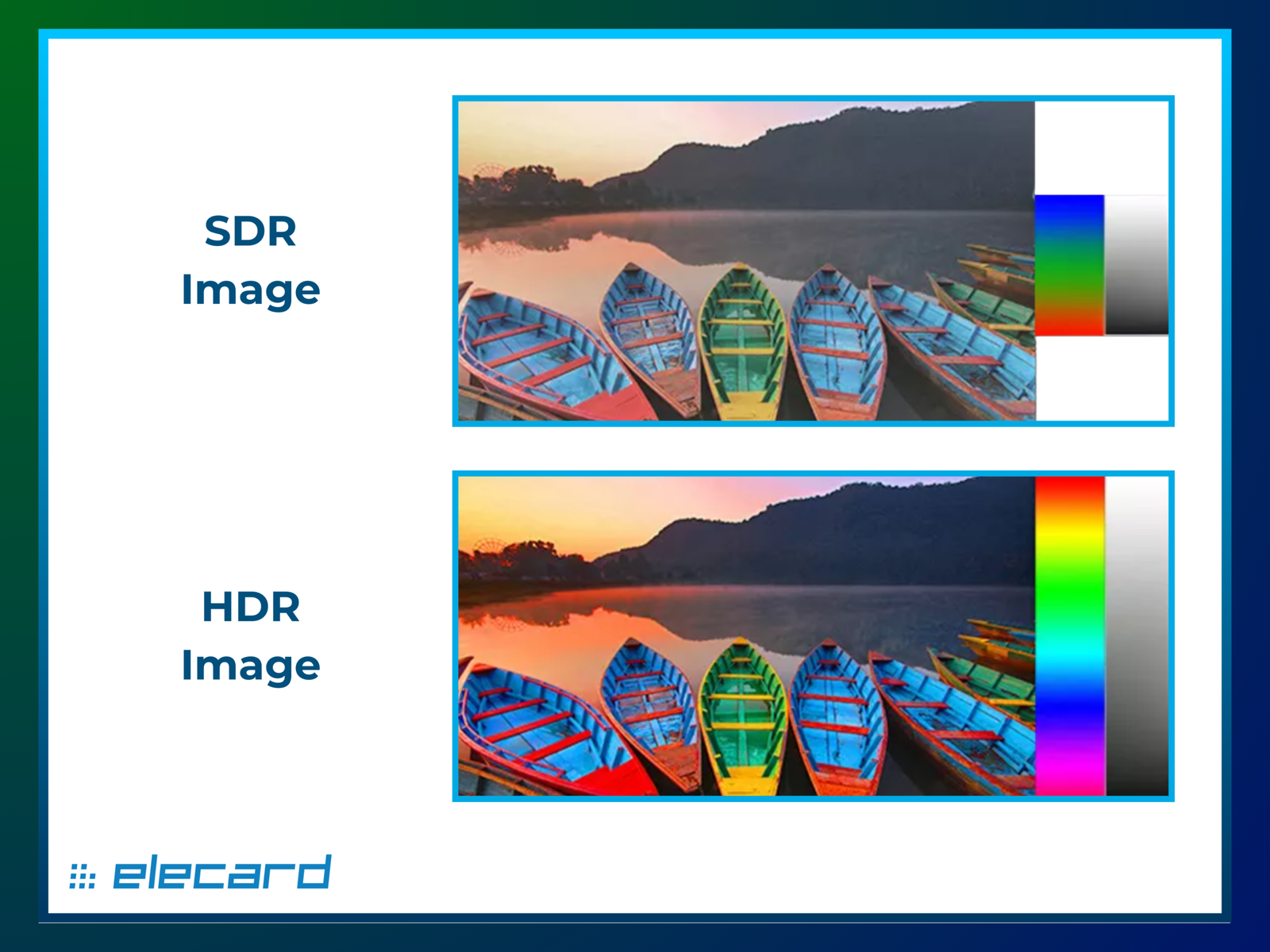
HDR extends the range between the darkest and brightest parts of an image and usually pairs that with a wider color gamut. For documentaries, the technical benefits translate into storytelling advantages:
- Greater highlight detail: Sunlit water, reflective surfaces, or stage lights retain detail instead of blowing out.
- Improved shadow nuance: Night exteriors, low-light interiors, and subtle skin textures can preserve detail without crushing blacks.
- More natural color transitions: Expanded gamut and bit depth reduce saturation clipping and banding, making greens, skies, and skin tones feel more lifelike.
Because many documentaries mix modern footage, structured interviews, and archival material, HDR offers tools to unify or contrast these elements intentionally. When used thoughtfully, HDR can help emphasize realism, depth, and the physical presence of a scene rather than simply making images “prettier.”
How documentary HDR grading differs from fiction films
Documentary HDR grading often has different goals and constraints than grading for scripted features.
Creative intent and restraint
Documentaries frequently prioritize authenticity and naturalism. Graders aim to preserve the look of the event or condition being documented rather than pushing dramatic color or hyper-real contrast. That means more conservative HDR highlights and color saturation in many documentary grades.
Handling archival and mixed-source material
Many documentaries include archival footage with limited dynamic range or different color encoding. Bringing archival assets into an HDR timeline requires careful restoration, subtle expansion of contrast where appropriate, and sometimes distinct grades so the archival material reads as historical while still fitting into an HDR program.
Practical delivery considerations
Documentaries often have smaller budgets and tighter delivery windows. Productions must manage multiple deliverables: HDR masters (commonly PQ/HDR10 or Dolby Vision in commercial contexts), SDR safety copies, and sometimes separate versions for broadcast, festival DCP, or online platforms. Each deliverable can require additional monitoring and tone-mapping work.
Metadata and creative choices
Unlike some feature VFX workflows where HDR is used for dramatic visual flourishes, documentaries use HDR metadata and grading decisions to preserve subtleties—skin texture, shadow detail, and highlight retention—without drawing attention to the technology itself. Graders might dial back specular highlights or use local contrast selectively to avoid the image feeling “over-processed.”
What viewers should expect when watching documentaries in HDR
For viewers, HDR can improve the experience, but the end result depends on multiple factors: the documentary’s grade, the display’s capabilities, the player or app, and how the platform handles tone mapping.
TVs, displays, and devices
Not all HDR-capable TVs are the same. Some achieve high peak brightness and wide color volume, others prioritize black-level performance, and many mid-range sets rely on tone mapping to fit HDR content into their capabilities. Mobile devices and laptops also vary widely in HDR support.
If a documentary is mastered in HDR, your device and app must support that HDR format (e.g., HDR10, Dolby Vision, HDR10+) and the streaming service must deliver it. Even when all those boxes are checked, different TVs will render the same HDR file differently because of peak brightness, error correction, and color processing.
Tone mapping and brightness
Tone mapping is how a display converts an HDR signal into what it can physically show. Good tone mapping preserves the artistic intent better; poor tone mapping can clip highlights, flatten shadows, or oversaturate colors. Be cautious about evaluating HDR on a display with very low peak brightness—subtle HDR benefits may be lost.
File-dependent differences
Some documentaries are graded specifically for HDR and can look noticeably richer. Others receive a minimal pass or are upconverted from SDR, which can produce mixed results. Where possible, check whether a title notes a dedicated HDR grade.
Banding, subtitles, and UI elements
HDR can reveal compression artifacts or banding if a stream is heavily compressed. Subtitles and on-screen graphics may also be authored in a way that assumes SDR contrast; a poorly designed subtitle box can become more distracting on very bright HDR images.
Practical steps for creators (filmmakers and colorists)
Below is a compact checklist to help documentary teams approach HDR responsibly.
Pre-production planning
– Budget time for HDR grading and for producing SDR deliverables derived from the HDR master. Discuss margin notes about archival footage and expected deliverables with post.Capture strategy
– Record in the widest practical picture profile and bit depth your camera supports to retain information. When shooting with limited dynamic range, expose for the highlights you most want to protect.Post-production grading
– Grade on a properly calibrated HDR monitoring system. If you must grade on a single HDR reference, check results on multiple consumer displays afterward.
– Retain creative restraint: avoid pushing speculars to unnaturally high values unless the story warrants it.Manage archival footage
– Restore and stabilize archival clips where necessary. Use separate grade passes to preserve a historical look while avoiding jarring transitions between sources.Deliverables and metadata
– Produce an HDR master and an SDR-grade derived via careful tone mapping (not simple conversion). If delivering multiple HDR profiles (e.g., HDR10 and Dolby Vision), follow the platform or distributor’s specifications.Test across devices
– Screen final masters on a range of consumer TVs and streaming devices to spot tone-mapping issues. Ask collaborators or festival programmers to review on different hardware if possible.
Note: specifications and platform requirements vary by vendor and region. Always verify delivery specs with platforms and manufacturers before finalizing masters.
Practical steps for viewers (how to get the best HDR experience)
Follow these steps to improve your HDR viewing without specialized gear.
Confirm HDR delivery
– Check the film’s description in your streaming app or the distributor’s notes to confirm it’s an HDR master.Use an HDR-capable device and app
– The TV or device and the streaming app must support the HDR format used. Consult the manufacturer or app documentation if unsure.Enable the correct modes, cautiously
– Many TVs have an “HDR” picture mode and additional picture-engine settings. Start with a neutral or “Filmmaker” mode where available, as these often preserve the director’s intent. Avoid overly aggressive enhancement modes that can clip highlights or oversaturate colors.Consider ambient lighting
– HDR benefits are easiest to appreciate in dim to moderate lighting. Very bright ambient light can reduce perceived contrast and color impact.Watch for updates
– TV firmware and streaming app updates can change HDR behavior; if something looks off, check for software updates.Compare SDR and HDR thoughtfully
– If your platform offers both SDR and HDR versions, test both on the same screen to judge whether HDR adds meaningful value in that particular title.
Comparison: SDR vs HDR for documentary attributes
| Attribute | SDR | HDR |
|---|---|---|
| Highlight detail | Limited, often clipped | Better preservation, more nuance (dependent on display) |
| Shadow detail | Can be crushed | More retrieval possible, but depends on tone mapping |
| Color gamut | Narrower | Wider, more saturated hues available |
| Archival footage compatibility | Straightforward | Requires careful restoration and grading |
| Creative subtlety | Familiar baseline | Allows subtle presence and depth, but needs restraint |
Common pitfalls to watch for
- Over-brightening: HDR shouldn’t always mean “brighter.” If highlights distract from the story, they should be restrained.
- One-size-fits-all grading: A single HDR grade that ignores archival assets or varying display capabilities can reduce clarity.
- Poor delivery metadata: Incorrect or missing metadata makes tone mapping less effective on consumer displays.
FAQ
Q: Will every HDR documentary look dramatically better than its SDR version?
A: Not necessarily. When an HDR grade is thoughtfully applied, it can reveal more detail and depth, but the visible improvement depends on the quality of the grade, the source material, the viewer’s display, and how well the streaming app preserves the master. Sometimes the difference is subtle and aimed at preserving fidelity rather than creating a showy effect.
Q: My TV supports HDR, but the documentary looks washed out—what gives?
A: That can be due to tone mapping, picture mode settings, or the TV’s peak brightness. Try selecting a neutral/filmmaker mode, verify the streaming app is outputting HDR, and consult your TV’s documentation on HDR picture settings. If problems persist, check for firmware updates.
Q: Are there special considerations for subtitles and captions in HDR?
A: Yes. High-brightness scenes and saturated backgrounds can make subtitles harder to read if they were authored for SDR contrast. Platforms and producers should test subtitle legibility across a range of scenes and displays.
Q: Do I need a top-tier TV to see HDR benefits?
A: No. Even mid-range HDR TVs can show improvements in shadow detail and color, but the scale of improvement varies. Verify your model’s HDR support and test titles known to have well-executed HDR grades.
Q: As a filmmaker, should I always grade in HDR now?
A: Not always. HDR is valuable when it supports the story or preserves captured detail. Consider audience, delivery platforms, and budget. If your documentary contains scenes where expanded highlights and color will enhance storytelling, HDR grading may be worth the investment.
Conclusion
HDR is maturing as a creative and technical option for documentaries. When used with restraint and attention to archival material and delivery requirements, HDR can deepen realism and preserve visual nuances that matter to a documentary’s narrative. For viewers, the experience depends heavily on device capability, correct app and TV settings, and whether the title received a dedicated HDR grade.
Creators should plan for the extra steps HDR requires—grading, alternate deliverables, and device testing—while viewers should verify device support and experiment with neutral picture modes for the most faithful presentation.
Disclosure: Settings and compatibility for HDR can differ by TV model, playback device, operating system, region, and firmware version. Verify current manufacturer documentation and platform delivery guides for specifics before assuming a capability.
For more about device setup and tuning, see our pieces on Devices & Setup and practical streaming notes in Streaming Guides. If you use third-party apps for playback, check guidance under Apps & Tools.

Canzar
Ready to stream? Pick your plan
Live TV, movies, sports and 10,000+ channels on any device — Firestick, Android TV, Smart TV, phone.
View Subscription Plans Compare Pricing
Moderation: Comments are reviewed before publishing. Be respectful and on-topic.
Guidelines: Share streaming tips, device help, or content recommendations. No spam, no promotions, no off-topic links.