
Last updated August 26, 2026 · Editorially reviewed by CanzarTV
Indoor vs Outdoor Access Points: Which to Use for Patio Streaming
Watching sports, movies, or video calls on the patio is increasingly common, and a reliable Wi‑Fi connection makes the experience enjoyable rather than frustrating. If your indoor Wi‑Fi doesn’t reach the yard, should you buy an outdoor access point (AP) or try to extend indoor coverage? This guide compares indoor and outdoor APs for patio streaming and gives practical steps to choose and set up the right solution for your space.
Quick answer
- For open or exposed patios, dedicated outdoor access points are usually the better long‑term choice: they’re designed for weather, mounting, and outdoor RF patterns.
- For covered patios close to your home, a well‑placed indoor AP, mesh node, or directional antenna can be a cost‑effective option.
- Always consider power and cabling options (PoE is common for outdoor APs), local regulations, and security settings.
Why this matters for patio streaming
Streaming video requires consistent throughput and low packet loss. Even if your indoor router advertises high speeds, walls, glass, and distance can reduce the usable signal on your patio. An access point placed with outdoor conditions and RF patterns in mind gives you better coverage, fewer dropouts, and a more pleasant streaming experience for handheld devices and smart TVs.
Key differences: indoor vs outdoor access points
| Factor | Indoor AP | Outdoor AP |
|---|---|---|
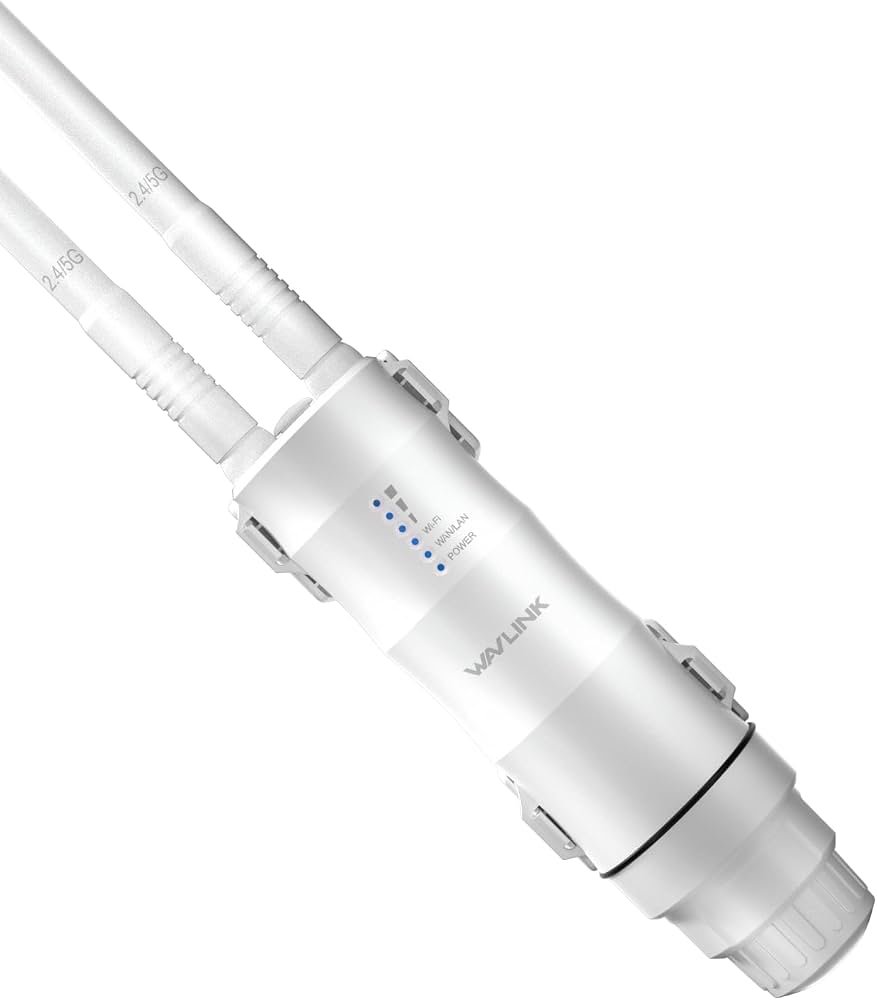
| Weatherproofing | Not designed for rain, sun or humidity | Enclosures and seals for rain, UV and condensation (IP ratings vary) |
| Mounting | Shelves or walls inside | Pole, eave, or wall mounts with hardware for exterior surfaces |
| Antenna design | Internal or low‑gain external | Higher‑gain external options; some models have directional antennas |
| Power options | Standard AC adapter | Often PoE (Power over Ethernet) for safe outdoor installation |
| RF tuning | Designed for indoor multipath environments | Tuned for longer outdoor ranges and different interference profiles |
| Maintenance | Easy to access | Designed for less frequent physical access; firmware updates still required |
| Cost | Generally lower | Typically higher due to ruggedization |
Notes: IP ratings, antenna specs, throughput and bands (2.4 GHz, 5 GHz, 6 GHz) differ by model and vendor. Verify details in manufacturer documentation before buying.
When to choose an outdoor access point
- The patio is open, exposed, or detached from the building by more than a few metres.
- You need reliable coverage across a yard, pool area, or rooftop terrace.
- You want professional-looking, permanent installation with durable hardware.
- There are frequent outages or weak signals despite indoor upgrades.
Advantages: long‑term durability, optimized outdoor RF patterns, professional mounting options, PoE simplifies power cabling. Drawbacks: higher upfront cost and the need for weatherproof cable runs and possibly surge/lightning protection.
When an indoor AP or mesh node is enough
- The patio is covered (under an awning or porch) and within a short distance of the router.
- You want a low‑cost solution or a temporary setup for occasional patio use.
- You already have a good mesh system and just need to add a node closer to the outdoor seating.
Advantages: cheaper, easier installation, simpler troubleshooting. Drawbacks: indoor devices are not weatherproof and may fail if exposed; signals can be inconsistent if there are lots of obstructions.
Practical setup steps for patio streaming (checklist)
Survey coverage
– Walk the patio with a phone or laptop and check signal strength and actual streaming quality where you’ll sit or mount a TV.
– Note where the indoor router or mesh nodes produce weak signals.Decide location and mounting
– Outdoor APs: mount high (eaves, poles) and aim antennas toward the seating/viewing area.
– Indoor APs or mesh nodes: place as close to an exterior wall or porch opening as possible, elevated, and away from large metal objects or HVAC equipment.Power and cabling
– Outdoor APs commonly use PoE; run a shielded, exterior‑rated Ethernet cable and use an in‑line surge protector where suggested by the manufacturer.
– If using an indoor AP to serve outdoors, avoid placing it where it can get wet; consider a weatherproof enclosure for any outdoor wiring penetrations.Network configuration
– Use WPA3 where available, or WPA2‑AES if device compatibility requires it.
– Create a dedicated SSID for guests or for devices used primarily outdoors to limit lateral access to sensitive devices.
– Enable band steering if available so capable devices use 5 GHz for lower interference.RF and channel selection
– For 2.4 GHz, choose less congested channels (1, 6, 11 in most regions) and avoid overlapping channels from neighbours.
– For 5 GHz, pick clear channels; outdoor environments may allow better use of higher channels for capacity.
– Consider using automatic channel selection but verify it periodically.Security and maintenance
– Disable WPS and default admin accounts; use a strong, unique admin password.
– Keep firmware updated (outdoor hardware can need updates to address security issues and performance improvements).
– Check physical mounts, seals and cable glands annually.Test streaming devices
– Test the actual streaming services and apps you use from the couch and the TV. Different apps buffer and react differently to packet loss.
Installation tips and safety
- Use PoE injectors and switches rated for the outdoors or install the PoE injector indoors near the entry point. Outdoor-rated Ethernet jacket (CMX or equivalent) is safer for direct runs.
- Grounding and surge protection are important for outdoor gear, especially in areas prone to lightning. If you’re unsure, consult a licensed electrician or installer.
- In some regions, outdoor mounting and antenna choices are limited by local regulations. Check local guidance if you intend to add high‑gain antennas or long-range directional equipment.
Common configurations and tradeoffs
- Indoor AP near a sliding glass door: low cost, preserves aesthetic inside, but signal may dip through thick glass or metal screens.
- Outdoor AP mounted to eave with PoE: more consistent coverage across patio and yard, professional look, requires cable routing and weatherproofing.
- Mesh node on porch with backhaul over Wi‑Fi: easy to set up but may sacrifice throughput if the backhaul is wireless; consider wired backhaul where possible.
Example comparison scenarios
1) Small covered balcony, apartment: start with an indoor AP or mesh node positioned close to the balcony door. Outdoor hardware is often unnecessary and may breach building rules.
2) Backyard patio attached to house: a weatherproof AP mounted under eaves or on an exterior wall is a reliable solution if you can run Ethernet. Choose a unit with PoE and the antenna pattern to match the coverage you need.
3) Rooftop or detached patio structures: an outdoor AP or directional unit aimed at the seating area is usually required to overcome distance and line‑of‑sight issues.
Troubleshooting tips
- If your video stutters: test with a wired connection where possible to identify whether the issue is the network or the streaming service.
- If devices can’t see the AP: confirm the SSID is broadcasting on the intended band, and check client compatibility (some older devices won’t see 5 GHz or 6 GHz networks).
- Intermittent drops outdoors: inspect cable glands and seals for moisture ingress; check for overheating in direct sun.
FAQ
Q: Can I use an indoor AP outdoors if I mount it under a covered porch?
A: You can in temporary or very sheltered situations, but indoor APs are not designed for humidity, temperature swings or insect ingress. If the device will be exposed to any moisture or sun for extended periods, choose a purpose‑built outdoor AP or use a certified weatherproof enclosure. Always follow manufacturer guidance.
Q: Do outdoor APs give better speed than indoor APs?
A: Not inherently. Outdoor APs are ruggedized and often have antennas suited for longer range, which can improve real‑world throughput at a distance. Throughput still depends on the AP’s radio(s), client device capabilities, and network backhaul. Verify speed capabilities with the vendor and test in your environment.
Q: Is PoE required for outdoor APs?
A: Many outdoor APs use PoE because it simplifies powering devices mounted away from outlets and keeps the electrical components indoors. Some models accept external power. Confirm the power options for any model you consider.
Q: What about mesh systems versus a single outdoor AP?
A: Mesh systems excel at covering complex indoor layouts and can help extend to small patios. For broad outdoor coverage or detached areas, a dedicated outdoor AP with wired backhaul usually offers more consistent performance.
Q: Will a directional antenna help on the patio?
A: Directional antennas can concentrate signal toward a viewing area and reduce interference from unwanted directions. They can be useful for targeted coverage but require careful aim and sometimes regulatory consideration. Check compliance with local rules.
Conclusion
For reliable patio streaming, choose the solution that matches your space and long‑term needs. Outdoor access points are best for exposed patios, yards, or detached spaces because they’re built for weather and outdoor radio environments. For covered or nearby patios, a strategic indoor AP or mesh node may be faster and cheaper. In every case, plan power and cabling carefully, secure the network settings, and keep firmware current.
If you’re unsure which route to take, start with a coverage survey and short‑term tests using a mesh node or temporary placement. That data will guide whether investing in a rugged outdoor AP makes sense.
For practical device setup tips, see our guides on Devices & Setup and security considerations in Tech & Security. For related streaming advice, check Streaming Guides and our latest posts on outdoor entertainment on the Blog.
Disclosure: Settings and compatibility can differ by TV, streaming device, operating system, region, and firmware version. Always verify the latest manufacturer documentation and local regulations before purchasing or mounting networking hardware.

Canzar
Ready to stream? Pick your plan
Live TV, movies, sports and 10,000+ channels on any device — Firestick, Android TV, Smart TV, phone.
View Subscription Plans Compare Pricing
Moderation: Comments are reviewed before publishing. Be respectful and on-topic.
Guidelines: Share streaming tips, device help, or content recommendations. No spam, no promotions, no off-topic links.