
Last updated August 26, 2026 · Editorially reviewed by CanzarTV
Mesh, Extender, or Second Router: Which Improves Streaming Reliability Most?
Streaming reliability—fewer pauses, consistent picture quality, and quick channel changes—depends heavily on how your home network covers the spaces where you watch. If Wi‑Fi drops or buffering are regular interruptions, many shoppers ask whether a mesh system, a Wi‑Fi extender, or adding a second router will help most. This guide compares the three options, explains how each affects streaming, and gives practical setup and optimization steps so you can make a decision that fits your home and budget.
Quick comparison at a glance
| Option | Typical impact on streaming reliability | Best for | Ease of setup | Tradeoffs |
|---|---|---|---|---|
| Mesh system | Most reliable when nodes are well placed and/or use wired backhaul — seamless roaming and consistent coverage | Larger homes, multiple floors, many mobile devices | Moderate (app-guided) | Costlier than extenders; requires compatible nodes |
| Wi‑Fi extender (repeater) | Can improve reach but may halve wireless throughput if using same band for backhaul; often introduces separate network names | Budget fixes for single dead zones | Easy to moderate | Possible reduced speed, handoff issues between networks |
| Second router (configured as router or access point) | Can be very reliable when wired backhaul used; flexible for wired devices and separate networks | Homes with Ethernet runs or powerline/CPL backhaul, advanced setups | Advanced (needs configuration) | Risk of double NAT if not configured as AP; additional hardware and setup knowledge required |
Note: exact results vary by device models, firmware and your home layout. Always check the manufacturer documentation for compatibility and configuration instructions.
How each approach works (and why it matters for streaming)
Mesh systems
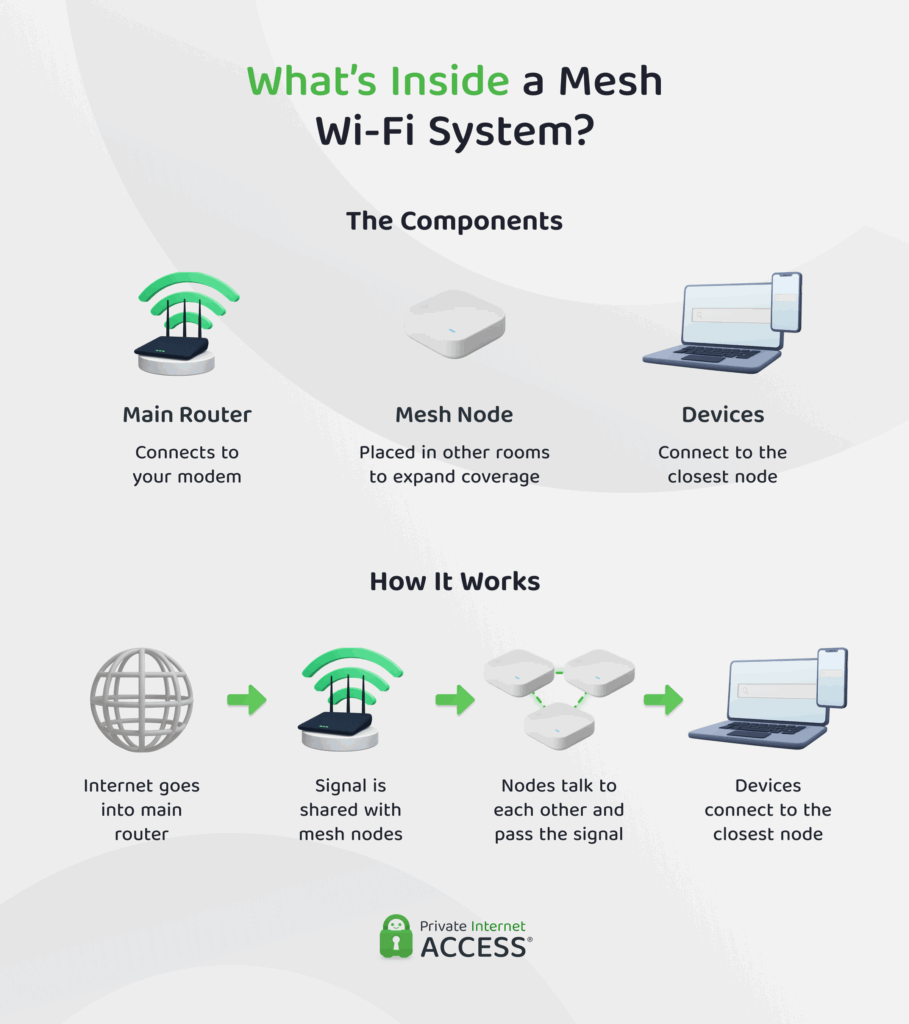
Mesh Wi‑Fi replaces or supplements your main router with multiple nodes that share a single network name (SSID) and coordinate traffic. Modern commercial meshes manage device connections and may use dedicated backhaul bands or allow wired Ethernet backhaul, which preserves wireless throughput. Mesh systems are designed for smooth roaming — devices move between nodes with minimal connection interruption — which helps prevent buffering during channel changes or when moving around the house.
Pros relevant to streaming: coordinated management, single SSID, easier coverage planning, and better roaming behavior.
Limitations: wireless backhaul can still limit throughput if nodes are poorly placed or too far apart; mesh solutions vary widely by manufacturer and model.
Wi‑Fi extenders (repeaters)
An extender sits between your main router and a weak-signal area, repeating the router’s wireless signal. Simple extenders can be quick and inexpensive to set up and are useful when only a small zone needs coverage. However, many repeat the signal over the same radio, which can reduce effective throughput because the extender spends time both receiving and retransmitting on the same channel.
Pros relevant to streaming: low cost and targeted improvement.
Limitations: potential speed loss, handoff issues when moving between router and extender, and multiple SSIDs depending on configuration.
Second router
A second router can be used in several ways: as a separate network, as an access point (AP), or as a router handling a different subnet. Connect it to your main gateway by Ethernet (preferred) or via powerline/mesh backhaul. When used as an AP or when bridged to the main network, it provides robust local coverage without the same throughput penalties as wireless extenders.
Pros relevant to streaming: stable wired backhaul avoids wireless backhaul penalties; ideal for rooms with smart TVs, consoles, or streaming boxes that can use Ethernet.
Limitations: requires more network know‑how to avoid double NAT and DHCP conflicts; may be overkill for small apartments.
How these choices affect streaming reliability
Streaming depends on three core network qualities: available throughput (bandwidth), low latency, and consistent packet delivery. Here’s how each option impacts those qualities:
- Throughput: Wired backhaul (Ethernet or dedicated mesh backhaul) preserves maximum speeds. Wireless extenders that use the same band for backhaul can reduce throughput. Mesh systems with a dedicated backhaul band or wired backhaul are better at maintaining throughput.
- Latency: Additional wireless hops (router → extender → device) can add latency, which matters for interactive streaming like game streaming or cloud gaming. Mesh or AP setups with wired backhaul generally keep latency lower.
- Handoffs and packet loss: Systems that coordinate roaming (mesh systems and properly configured APs) typically reduce packet loss during handoffs. Extenders or separate SSIDs can cause devices to cling to a weak signal and experience drops.
In short: for the most consistent streaming performance, prioritize solutions that minimize wireless hops and enable wired backhaul where possible.
Practical decision checklist
Ask these questions to pick the right option:
- Is there Ethernet available between rooms? If yes, a second router set to access‑point mode or mesh nodes with wired backhaul usually deliver the best reliability.
- How large is the area you need to cover, and are there multiple floors? Mesh systems scale well across larger footprints and multi‑story homes.
- How many simultaneous streams and devices will you have? High device counts favor mesh or wired APs with quality-of-service (QoS) features.
- Is budget a primary concern? A targeted extender can be a low-cost fix for a single dead zone, but it may not be a long‑term solution for multiple rooms.
- Do you want a single network name (SSID) for roaming? Mesh systems and properly configured APs provide that experience; extenders sometimes create separate SSIDs.
Answering these will guide you toward the solution that balances cost and performance for streaming.
Step‑by‑step: setup tips for each option
Below are practical steps to get the most streaming reliability from each approach. These are generic instructions — check your device manual for model‑specific steps.
Mesh system — recommended setup
- Replace or pair the main gateway according to the mesh manufacturer’s instructions.
- Place the primary node near your modem/gateway and connect by Ethernet if required.
- Space secondary nodes where signal from the primary is still strong (not at the edge of dead zones). Use the mesh app’s signal meters where available.
- If possible, connect nodes with Ethernet for a wired backhaul — this preserves wireless bandwidth.
- Use a single SSID that the mesh system manages and let the system handle band steering and roaming.
- Update node firmware after setup.
Wi‑Fi extender — recommended setup
- Start by placing the extender in the same room as the router for initial setup, then move it to a midpoint location.
- Use the extender’s app or web interface to connect it to your router. Consider giving it the same SSID and password as the main router only if the extender explicitly supports seamless roaming; otherwise use a different SSID to control device connections.
- If your extender supports Ethernet backhaul, use it — or consider a powerline adapter to provide a wired link.
- Test streaming in the intended zone and refine placement.
Second router (as AP) — recommended setup
- Disable DHCP on the second router if you want devices to remain on the primary router’s subnet (or configure routing intentionally if you want separate networks).
- Connect the routers via Ethernet (LAN port to LAN port if using AP mode). For wireless links, consider mesh or powerline adapters instead of ad‑hoc wireless bridging.
- Use the same SSID and security settings only if you want seamless roaming and you can guarantee proper channel planning and DHCP handling.
- Check for double NAT if you left the second unit in router mode — this can affect some streaming apps and services.
Always verify setup by running a speed test and streaming a high-bitrate title to look for buffering or quality drops.
Optimization tips specifically for streaming
- Prefer Ethernet for high‑bandwidth devices (smart TVs, consoles, streaming boxes). Wired always beats wireless for stability.
- Prioritize 5 GHz or newer Wi‑Fi 6/6E bands for devices that support them to reduce interference and increase throughput; verify device compatibility.
- Use QoS settings to prioritize streaming devices or ports if your router/mesh supports it. Some systems offer application‑level prioritization for streaming services.
- Update firmware on routers, mesh nodes, extenders and streaming devices to fix bugs and improve performance.
- Avoid placing nodes/extenders near microwaves, cordless phones, baby monitors, or large metal objects that can block signals.
- If you notice devices sticking to a weak signal, try a different SSID per band or enable the router’s/mesh’s roaming aggressiveness settings if available.
Common pitfalls and how to avoid them
- Using the same SSID on extender/router/AP without proper configuration: can cause poor handoffs. If unsure, set different SSIDs and test.
- Relying on wireless backhaul across long distances or through thick walls: results can be slow and inconsistent. Use wired backhaul if possible.
- Leaving the second router in full router/NAT mode: can create double NAT issues that affect streaming, gaming and remote access. Use AP/bridge mode if you just want more Wi‑Fi.
- Overlooking firmware updates: manufacturers frequently release fixes that improve stability.
Scenario recommendations (general guidance)
- Small apartment or single room: A higher‑quality single router or a budget extender targeted at the dead zone often suffices.
- Large house or multi‑floor home: Mesh with wired backhaul where possible is the most straightforward way to get consistent streaming across rooms.
- Home with Ethernet runs or many wired devices: Use a second router configured as an access point or mesh nodes with wired backhaul for best performance.
- Budget constraint, single dead zone: A reputable Wi‑Fi extender can be a cost‑effective stopgap — but plan to upgrade if you add devices or expand coverage.
FAQ
Q: Will a mesh system eliminate buffering?
A: A mesh system reduces the chance of buffering caused by weak coverage or poor roaming, but buffering can still occur from ISP congestion, streaming service issues, or insufficient internet plan bandwidth. Check both your Wi‑Fi and your external connection when diagnosing.
Q: Can I use my existing router with a mesh system?
A: Many mesh systems can work with or replace an existing router. Some require you to put your current gateway into bridge/modem mode or to configure the mesh as the main router. Check manufacturer guidance before purchasing.
Q: Do extenders reduce speed for streaming?
A: Some extenders can reduce effective wireless throughput if they use the same radio to receive and retransmit. Using an extender with Ethernet backhaul or a dual‑band extender that dedicates one band for backhaul can reduce this penalty.
Q: Is a second router better than a mesh?
A: A second router with wired backhaul can match or exceed mesh performance, especially for wired devices; but it requires more manual configuration. Mesh solutions simplify management and roaming for mixed device environments.
Q: How important is firmware and software updates?
A: Very important. Updates fix bugs, improve performance and sometimes add features that improve streaming and stability. Always check manufacturer release notes and apply updates when convenient.
Q: What about signal interference and channel selection?
A: Interference from neighbors or household electronics can affect streaming. Many modern systems auto‑select channels, but advanced users can pick less congested channels manually using Wi‑Fi analyzers.
Conclusion
There is no single perfect answer: “mesh vs extender vs second router for streaming” depends on your home layout, available wiring, number of devices and budget. For consistent, seamless streaming across a larger footprint and multiple devices, a mesh system (ideally with wired backhaul) is typically the simplest reliable option. A second router used as an access point delivers excellent reliability when you can provide a wired backhaul. Wi‑Fi extenders can be a useful, budget‑friendly fix for one or two dead zones but may reduce throughput and complicate roaming.
Start by testing existing speeds and coverage, then choose the solution that minimizes wireless hops and allows Ethernet backhaul where possible. Follow manufacturer setup steps and apply optimizations like QoS and firmware updates to get the best streaming experience.
Disclosure: Settings and compatibility can differ by TV, device, operating system, region, and firmware version. Verify current manufacturer documentation for model‑specific instructions and compatibility.
For more on setting up streaming devices and optimizing home networks, see our Devices & Setup, technical tips on Streaming Guides, and related posts on the Blog.

Canzar
Ready to stream? Pick your plan
Live TV, movies, sports and 10,000+ channels on any device — Firestick, Android TV, Smart TV, phone.
View Subscription Plans Compare Pricing
Moderation: Comments are reviewed before publishing. Be respectful and on-topic.
Guidelines: Share streaming tips, device help, or content recommendations. No spam, no promotions, no off-topic links.