
Last updated August 27, 2026 · Editorially reviewed by CanzarTV
Mini-LED Local Dimming: How Zones Affect Blooming and HDR Highlights
Short version: mini-LED sets use many small backlight zones to improve contrast and HDR peak control, but the interaction between zone count, zone size, processing and HDR metadata determines how much visible blooming (the “halo” effect) you’ll see. This guide explains the technical basics, what to look for, and practical steps you can take to reduce blooming while preserving HDR highlights.
Why mini-LED matters for HDR picture quality
Mini-LED backlights are a refinement of full-array local dimming (FALD). Instead of a few dozen large zones, mini-LED designs use hundreds to thousands of much smaller LED elements to dim or brighten parts of the screen independently. That lets manufacturers achieve deeper blacks next to bright objects and higher localized peak brightness for HDR highlights.
But real-world performance depends on more than the raw LED count. Zone mapping, the dimming algorithm, the panel’s native contrast, optical design, and how HDR signals and metadata are handled all influence whether a bright object on a black background appears crisp or surrounded by a visible halo.
What is blooming (the halo effect)?
Blooming — sometimes called the halo effect — is when bright objects cause a glow or flare around them against darker surroundings. On displays with local dimming, blooming happens when a bright region forces its local dimming zone (or adjacent zones) to increase brightness, and the light bleeds into nearby darker areas.
Key contributors to visible blooming:
– Zone size and count: larger zones cover more pixels, so a single bright item can force a wide area to brighten. More zones with smaller coverage reduce this problem in principle.
– Zone control algorithm: how aggressively the TV ramps brightness up or down, and whether it applies smoothing between zones.
– Optical diffusion: the layers between the backlight and the viewer (diffusers, polarizers, and the LCD cell) can spread light laterally.
– Panel characteristics: an OLED pixel can turn off individually; LCD-based mini-LED cannot.
Zones: count, size, and effective behavior
It’s tempting to assume “more zones = less blooming”. That’s directionally true, but incomplete.
- Zone count is one factor: more, smaller zones generally give finer control over local brightness.
- Zone allocation and mapping matter: some TVs use fixed rectangular zones, others use irregular clusters. The apparent result on-screen depends on how those zones align with bright content.
- Effective behavior can be influenced by grouping and temporal smoothing. Manufacturers often limit abrupt changes to avoid flicker, which can cause adjacent zones to sit at intermediate brightness values and still produce a halo.
Because manufacturers implement local dimming differently, two sets with identical LED counts can look quite different. Always verify performance using reviews and in-store viewing when possible.
How local dimming affects HDR highlights
High Dynamic Range (HDR) content takes advantage of displays that can produce very bright highlights and deep blacks simultaneously. Mini-LED local dimming helps in two ways:
- Peak highlights: small, bright elements (specular highlights, reflections, lens flares) can be presented at higher peak luminance because the rest of the screen can remain dim.
- Black level control: dark areas can be held low while nearby highlights are bright—if zones are small enough and the algorithm is good.
But when a bright HDR element sits inside a larger dimming zone, the TV must brighten that whole zone. If the zone covers dark background pixels, you’ll see a glow around the bright element. The severity depends on zone size, algorithm behavior, and the display’s optical characteristics.
Dynamic metadata formats such as Dolby Vision and HDR10+ can help by telling the TV what the creative intent is frame-by-frame. That information lets the TV make more intelligent trade-offs between peak preservation and halo suppression, but it still can’t change the physical size of zones.
Practical comparisons and expectations
Without citing model-specific numbers, here are general tendencies buyers and calibrators will notice:
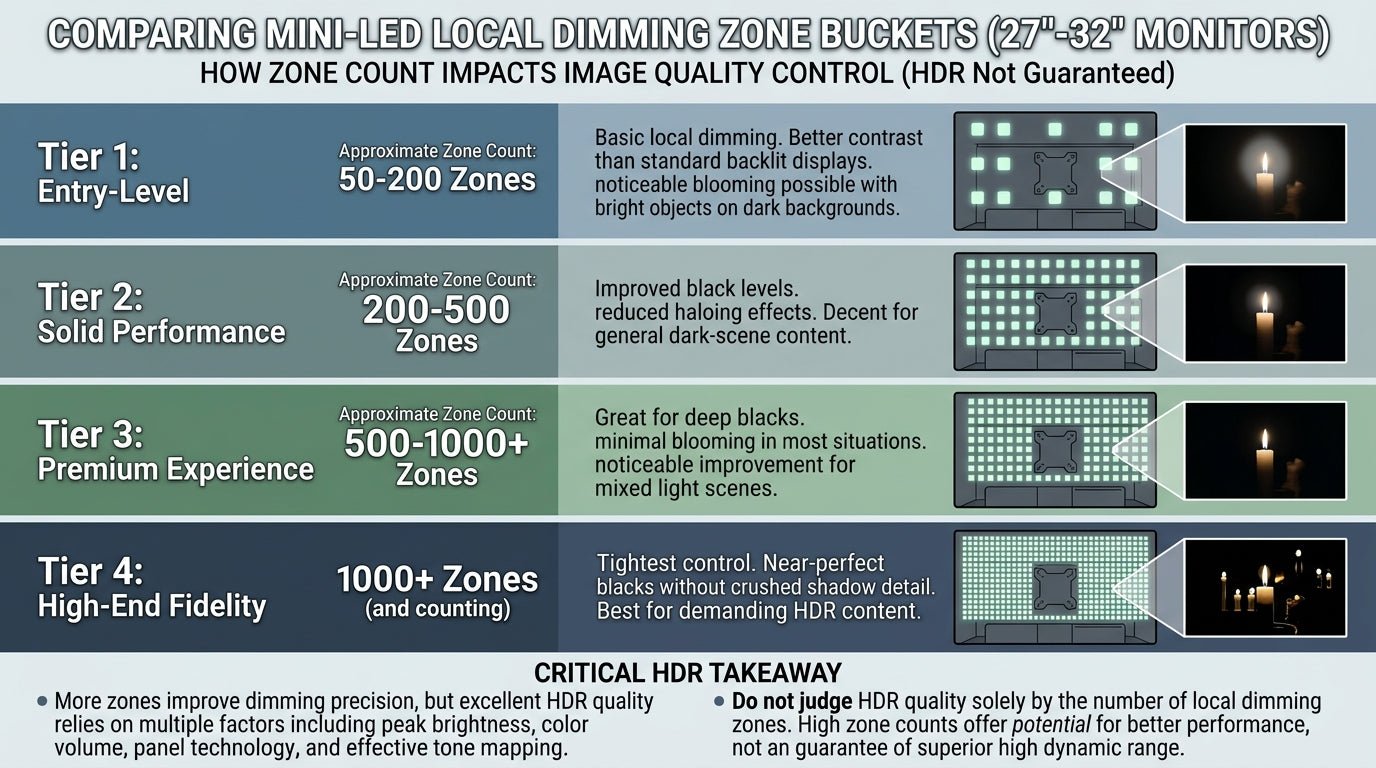
- Low zone counts (dozens): Likely to show large halos around bright objects, especially on mostly dark scenes. Edge-lit, non-FALD designs fall in this category.
- Moderate zone counts (hundreds): Often a good balance of improved contrast and manageable blooming; processing quality becomes a differentiator.
- Very high counts (thousands): Potential for the best local control and least blooming in principle, but real performance still depends on optical design and processing.
Remember: the human eye is sensitive to local contrast at edges. Even small amounts of light bleed near a very dark region are noticeable.
How to evaluate a mini-LED TV for blooming and HDR
If you’re shopping or calibrating, use these checks to evaluate blooming behavior.
- Look for mixed scenes: scenes with small bright elements against dark backgrounds (night cityscapes, stars, specular highlights) are the best stress tests.
- Use test patterns: full-screen bright, single bright window on black, and small bright rectangles are common test patterns used by reviewers.
- Check HDR content across platforms: different streaming apps and hardware can send different HDR metadata. Test sample HDR scenes you know.
- Read professional reviews and measurements: reviewers often measure zone response, contrast, and halo width. Combine objective tests with your own viewing.
- Pay attention to blooming vs. glow: some displays have a constant veil of raised black floor (glow) caused by panel or optical properties rather than local dimming.
For a hands-on buyer, in-store viewing can help, but store demo settings and ambient light can mask blooming, so supplement with home testing if possible.
Settings and steps to reduce visible blooming at home
Even with the best set, you may want to tune settings to reduce halo while keeping HDR impact. Consider these adjustments:
- Local Dimming Mode: Many TVs offer multiple modes (Off / Low / Medium / High / Adaptive). “Off” removes dimming-related halos but also loses much of the HDR benefit. Start at Medium or Adaptive and compare.
- Brightness/Backlight: Reduce the overall backlight or OLED/LED brightness if a scene shows exaggerated halos; this can reduce the relative contrast that highlights push into zones.
- Contrast: Keep contrast high enough for punch but avoid extremes that force the TV to clip or push zones to their limits.
- Black Level / OLED Light: On OLEDs this is different; on mini-LED LCDs, adjusting black level can affect how the TV maps signal to zones.
- Motion / Smoothing / Adaptive settings: Some processing modes change how local dimming is applied. Try turning aggressive motion smoothing off to see default dimming behavior.
- Software updates: Manufacturers refine local dimming algorithms via firmware. If you notice new issues or improvements, check for updates.
A practical approach: test a few HDR clips with local dimming off and on, at different levels, and pick the mode that balances highlight impact with acceptable halo.
When blooming is more or less noticeable
Blooming shows up more in certain viewing situations:
- Dark room viewing increases perceived halo visibility.
- Large-distance viewing makes halos look smaller in angular size, but they remain perceptible.
- Very small bright specular highlights (e.g., twinkling stars) are most prone to being lost or surrounded by a halo.
Conversely, bright-room viewing or busy scenes (sports, nature documentaries) tend to mask halo because the eye focuses less on tiny local contrast anomalies.
Comparison table: what different backlight approaches typically deliver
| Backlight type | Typical zone count | Typical benefits | Blooming tendency |
|---|---|---|---|
| Edge-lit LCD | None or very few | Thin panel, lower cost | Higher — whole-edge control causes glow |
| Full-array local dimming (FALD) | Dozens | Improved blacks and contrast | Moderate — depends on zone size |
| Mini-LED FALD | Hundreds–thousands (varies) | Much finer local control, higher peaks | Lower in best implementations, but still present |
| OLED (per-pixel) | N/A (per-pixel control) | True blacks, no local-dimming halos | Very low for halo, but other differences (brightness longevity, burn-in factors) |
Note: The ranges above are illustrative of broad differences. Specific model behavior can vary; check manufacturer documentation and reviews for exact details.
Trade-offs manufacturers make
To balance HDR shine and halo control, TV makers tune algorithms to:
- Preserve specular highlights at the expense of a slightly larger halo.
- Minimize halo but clamp peak brightness, making highlights less impactful.
- Smooth transitions to avoid flicker, which can create a perceptible fixed glow.
Which trade-off you prefer is subjective. Some viewers prioritize cinematic accuracy and deep blacks; others prioritize dramatic HDR pop.
FAQ
Q: Will more local dimming zones completely eliminate blooming?
A: No. More, smaller zones reduce the potential size of a halo, but physics (optics, diffusers, and the LCD cell) and processing still limit total elimination. OLED remains the only mainstream per-pixel-emissive technology that avoids local-dimming halos entirely.
Q: Does HDR metadata fix blooming?
A: Dynamic HDR metadata (Dolby Vision, HDR10+) helps the display make smarter decisions, but it can’t change the physical layout of zones. It can reduce unnecessary brightening and improve mapping, which may reduce perceived halo in many scenes.
Q: Should I turn local dimming off to avoid halos?
A: Turning it off can remove dimming-related halos but also removes the localized contrast benefits that make HDR look impactful. Try different levels (Low, Medium, Adaptive) to find a compromise.
Q: Are software updates important for halo reduction?
A: Yes. Manufacturers regularly refine dimming algorithms and zone behavior with firmware. Keep your TV updated and re-evaluate settings after updates.
Q: Which is better for HDR: mini-LED or OLED?
A: They are different. OLED provides true per-pixel black and no local-dimming halos but may have lower sustained peak brightness than some mini-LED sets. Mini-LED can reach higher localized peaks and better highlight punch, at the cost of potential blooming. Which is “better” depends on your priorities and viewing conditions.
Conclusion
Mini-LED local dimming is a meaningful step forward for LCD HDR, allowing much brighter highlights and better localized contrast than older LED designs. However, visible blooming depends on zone count, zone mapping, algorithmic choices, optical design, and HDR metadata handling. When shopping or tuning a TV, use mixed content and test patterns, try different local dimming modes, and read professional reviews to see measured behavior.
Disclosure: Settings, behavior, and compatibility can differ by TV model, playback device, operating system, region, and firmware version. Manufacturers tune local dimming algorithms and may apply changes via updates; always check current product documentation and reputable reviews for model-specific details.
Further reading and resources:
– Devices & Setup for setup tips and display basics
– Streaming Guides for how HDR content can vary by app and device
– Blog for broader coverage of picture technologies and display industry trends

Canzar
Ready to stream? Pick your plan
Live TV, movies, sports and 10,000+ channels on any device — Firestick, Android TV, Smart TV, phone.
View Subscription Plans Compare Pricing
Moderation: Comments are reviewed before publishing. Be respectful and on-topic.
Guidelines: Share streaming tips, device help, or content recommendations. No spam, no promotions, no off-topic links.