
Last updated August 27, 2026 · Editorially reviewed by CanzarTV
How to Interpret TV Spec Sheets: A Quick Guide to HDR-Related Terms
Buying a TV for HDR (High Dynamic Range) playback can feel like learning a new language. Spec sheets list numbers and acronyms—nits, PQ, HDR10, contrast ratios—that matter, but manufacturers present them in different ways. This guide walks through the HDR-related terms you’ll most often see, explains what they actually mean for picture quality, and gives practical steps to compare models and validate performance.
Note: manufacturer claims, numbers, and features can vary by model, region, firmware, and retailer. Verify current manufacturer documentation and independent reviews for the specific set you’re considering.
Why HDR specs matter (brief)
HDR expands the range between the darkest and brightest parts of an image and increases color volume. On spec sheets, HDR-related items are intended to tell you how well a TV can reproduce highlights, deep blacks, and wide color—key factors for HDR content such as streaming movies, HDR Blu-rays, and some games.
That said, raw specs don’t always tell the whole story. Calibration, tone mapping, local dimming design, and the TV’s processing greatly influence real-world HDR performance.
Common HDR terms on spec sheets (and what they mean)
Below is a practical glossary of HDR entries you’ll see and how to interpret them.
Nits (peak brightness)
- What it is: A nit is a unit of luminance (candelas per square meter). On spec sheets, “peak brightness” or “peak nits” describes the maximum brightness a TV can reach for small highlights or full-screen scenes.
- Practical impact: Higher peak nits help bright highlights (sun, specular reflections) look more dramatic and closer to what the director intended. However, sustained brightness, color accuracy at high outputs, and tone mapping quality also matter.
- Caveat: Manufacturers may quote peak brightness for a tiny windowed highlight (e.g., 1% of screen area) which is not the same as the brightness for larger scenes.
Contrast ratio (static and dynamic)
- What it is: Contrast ratio compares the brightest white a display can produce to the black level it can achieve. Static contrast refers to the panel’s inherent ability; dynamic contrast can involve local dimming.
- Practical impact: Higher static contrast often yields deeper blacks and better shadow detail, which helps HDR feel more three-dimensional. Dynamic contrast numbers can be inflated by aggressive backlight control.
- Caveat: Different measurement methods (ANSI vs full-field) produce different numbers. Treat ratios from marketing sheets cautiously and prefer measured tests from reviewers.
Local dimming (FALD, Edge-lit, Zoned)
- What it is: Local dimming divides the backlight into regions (zones) that can dim independently. Full-array local dimming (FALD) with many zones typically performs better than edge-lit implementations.
- Practical impact: Effective local dimming improves black levels in mixed scenes and reduces haloing around bright objects.
- Caveat: The number of zones and the dimming algorithm matter; more zones are generally better, but implementation quality is crucial.
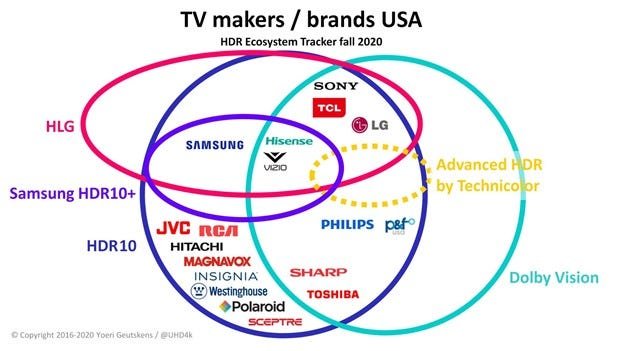
HDR formats and metadata: HDR10, Dolby Vision, HDR10+, HLG
- HDR10: An open standard that uses static metadata (SMPTE ST 2086) describing mastering display luminance and color primaries.
- Dolby Vision: A proprietary format that supports dynamic metadata, which can optimize tone mapping on a scene- or frame-by-frame basis. It also defines a very wide possible peak brightness range (theoretical values reach very high nits), though actual playback depends on the content and TV.
- HDR10+: A royalty-free alternative to Dolby Vision that uses dynamic metadata.
- HLG (Hybrid Log-Gamma): Designed for broadcast HDR, using a curve compatible with SDR displays.
- Practical impact: Support for dynamic metadata (Dolby Vision or HDR10+) can improve highlight and shadow rendering when the TV handles the metadata well.
- Caveat: Not all apps or sources provide dynamic metadata, and support varies by streaming service, disc player, and TV model.
PQ, ST 2084, and HLG
- PQ (Perceptual Quantizer) and SMPTE ST 2084: The electro-optical transfer function used by HDR10 and Dolby Vision to map electrical signal to displayed brightness.
- HLG: Uses a different transfer designed for live broadcasts.
- Practical impact: These are the signal curves; you don’t need to choose them, but it’s useful to know which one the TV handles and which content uses.
Color gamut claims: DCI-P3, Rec.2020, BT.2020
- DCI-P3: Common reference for digital cinema color space. Many modern HDR sources are graded to DCI-P3.
- Rec.2020 (BT.2020): A much larger color space used as a reference for UHD. Few displays fully cover Rec.2020, but wider coverage of DCI-P3 is more relevant today.
- Practical impact: Higher percentage coverage of DCI-P3 generally means richer colors for HDR content. Look for measured coverage from independent reviewers when possible.
Bit depth (10-bit, 12-bit)
- What it is: Bit depth indicates how many steps are available per color channel. HDR content and modern formats typically assume 10-bit sources to reduce banding.
- Practical impact: TVs that support 10-bit processing avoid visible banding on gradients if the source and pipeline (HDMI, player) are 10-bit-capable.
- Caveat: Some TVs use 8-bit panels with dithering or 10-bit processing—marketing sometimes glosses over this distinction.
Metadata: static vs dynamic; mastering luminance (MaxCLL) and MaxFALL
- Static metadata (HDR10) includes MaxFALL (maximum frame-average light level) and MaxCLL (maximum content light level), which describe how bright the brightest frames and the average frames are in the mastered content.
- Dynamic metadata (Dolby Vision, HDR10+) provides per-scene or per-frame data to guide tone mapping.
- Practical impact: Dynamic metadata gives TVs more information to optimize highlights and shadows. For HDR10, good tone mapping must infer more from the TV’s capabilities.
Tone mapping
- What it is: The TV’s process of converting the brightness and color of mastered content to what the display can actually reproduce.
- Practical impact: Even with lower peak nits, a TV with well-implemented tone mapping can render HDR scenes more faithfully than a brighter TV with poor tone mapping.
- Caveat: Manufacturers rarely publish tone mapping behavior; rely on hands-on reviews.
HDR peak vs sustained brightness (windowed vs full-screen)
- What you’ll see: Some specs emphasize peak brightness measured using a tiny bright area, while others quote larger-area brightness. Windowed (small area) peaks are less useful for everyday viewing than sustained or average brightness.
- Practical tip: Look for measured numbers from reviewers for both small-window and full-screen HDR performance.
Quick-reference comparison table
| Term | What it means | Why it matters for HDR |
|---|---|---|
| Nits / Peak Brightness | Max luminance (cd/m²) often measured for small highlights | Higher values help bright highlights pop; check whether the quoted number is a small-area or full-field measurement |
| Static Contrast Ratio | Ratio of peak white to black level (panel-driven) | Higher static contrast improves shadow detail and depth |
| Local Dimming (FALD/Zones) | Backlight architecture that dims parts of the screen independently | Reduces blooming and produces deeper blacks in mixed scenes |
| HDR Formats (HDR10/DV/HDR10+/HLG) | Supported HDR delivery formats and metadata types | Dynamic formats (DV/HDR10+) can yield better scene-by-scene rendering |
| Color Gamut (DCI-P3/Rec.2020) | Portion of color space the panel reproduces | Wider gamut allows more saturated, accurate HDR colors |
| Bit Depth (10-bit/12-bit) | Color steps per channel | 10-bit is standard for HDR to minimize banding |
| Tone Mapping | TV’s mapping of mastered content to the panel | Critical for believable HDR on displays with limited peak brightness |
Practical steps to interpret a spec sheet when shopping
- Start with supported HDR formats
- Check which HDR formats the TV claims to support: HDR10 is baseline; Dolby Vision and HDR10+ add dynamic metadata. If you stream from services like Netflix, Prime Video, or Disney+, confirm which formats each app supports on that TV.
- Look at peak brightness but read the fine print
- Note whether the manufacturer specifies the area used for peak nits (e.g., 1% window) and whether the number is for a test pattern. Compare to independent measurements where possible.
- Compare color gamut claims
- Spec sheets often quote percentage coverage of DCI-P3 or Rec.2020. Higher DCI-P3 coverage is more practical today. Use measured coverage from reviews to judge accuracy.
- Check for local dimming details
- If local dimming is listed, look for the type (FALD vs edge-lit) and the number of zones when provided. More zones and a good algorithm usually mean better handling of mixed dark/bright scenes.
- Note panel type and contrast hints
- OLEDs typically offer infinite contrast (very deep blacks) because each pixel can turn off; LCDs vary widely depending on backlight. If the spec lists contrast ratio, remember measurement methods vary.
- Verify HDMI and processing capabilities
- For game-focused HDR, confirm HDMI bandwidth (for 4K/120Hz or VRR) and whether the TV supports 10-bit color over HDMI at the desired resolution and refresh rate.
- Read independent measurements and reviews
- Because many HDR behaviors (tone mapping, sustained brightness, color accuracy) aren’t fully captured by spec sheets, rely on trusted reviews that measure the set under realistic conditions.
- Consider viewing environment and content
- If you watch in a bright room, higher sustained brightness helps. For dim rooms, deep blacks and good contrast often matter more.
How to validate HDR behavior after purchase
- Use known HDR demo clips and test patterns (available from calibration discs and online sources) to verify tone mapping, highlight roll-off, and banding.
- Check that your source device and app output HDR correctly: set the player or console to send HDR and 10-bit if required.
- Try different picture modes (e.g., Movie/Cinema vs Vivid/Game) and check for automatic HDR processing settings.
- Look for firmware updates: manufacturers sometimes improve HDR handling over time.
Common spec-sheet red flags
- Very high peak-nit claims without context (area, test pattern).
- Vague statements like “HDR compatible” without listing supported formats.
- Marketing phrases such as “10-bit color” without clarifying if it’s native panel depth or achieved through dithering.
- No information on local dimming or zone count if the TV is LCD-based and claims excellent black levels.
FAQ
Q: Is higher peak nits always better for HDR?
A: Not always. Higher peak brightness helps highlight detail, but good tone mapping, color accuracy, and contrast are equally important. A TV with moderate peak brightness but excellent tone mapping and deep blacks can produce very satisfying HDR.
Q: Do I need Dolby Vision to enjoy HDR?
A: You don’t need Dolby Vision to experience HDR—HDR10 remains the baseline format. Dolby Vision or HDR10+ can improve scene-by-scene rendering if the content and TV support them, but many movies and shows look excellent on HDR10 when the TV handles tone mapping well.
Q: What’s the difference between HDR10 and HDR10+?
A: HDR10 uses static metadata applied to the whole program; HDR10+ adds dynamic metadata that can change per scene or frame. The practical difference depends on whether content and the TV both support HDR10+.
Q: Why do TVs with high contrast ratio numbers still look washed out in HDR?
A: Contrast ratio claims don’t account for tone mapping, color reproduction, or local dimming behavior. Poor tone mapping or limited color volume can make HDR look flat even if black levels or peak brightness are nominally strong.
Q: Should I trust the manufacturer’s spec sheet or independent reviews?
A: Use both. Spec sheets give baseline compatibility and claimed figures; independent measurements and hands-on reviews reveal how the TV performs in real life.
Short disclosure
HDR performance, supported formats, and settings can differ by TV model, connected device, operating system, region, and firmware version. Always verify features and compatibility against the manufacturer’s current documentation and the streaming app’s supported formats.
Conclusion
Understanding HDR-related terms on TV spec sheets helps you ask the right questions and compare sets more effectively. Focus on supported HDR formats, realistic peak brightness (and whether it’s small-area or full-field), color gamut coverage, the presence and quality of local dimming, and the TV’s handling of tone mapping. Because many important behaviors aren’t fully captured by marketing numbers, pair spec-sheet reading with independent reviews and, when possible, an in-store look or hands-on testing.
For more on choosing and setting up displays and streaming devices, check our guides in Streaming Guides and Devices & Setup. For news and longer explainers, see our Blog.

Canzar
Ready to stream? Pick your plan
Live TV, movies, sports and 10,000+ channels on any device — Firestick, Android TV, Smart TV, phone.
View Subscription Plans Compare Pricing
Moderation: Comments are reviewed before publishing. Be respectful and on-topic.
Guidelines: Share streaming tips, device help, or content recommendations. No spam, no promotions, no off-topic links.