
Last updated August 25, 2026 · Editorially reviewed by CanzarTV
App discovery on connected TVs: how home screens rank and surface new apps
Introduction
Connected-TV home screens are the primary way most people discover streaming services and apps on smart TVs and streaming devices. Manufacturers and platform owners continuously refine how tiles, rows, and recommendations are chosen to surface fresh content and apps — but the signals they use and the options available to publishers and users vary widely across platforms and regions. This article explains the common ranking signals, the kinds of on-screen placements you might see, practical steps both developers and viewers can take to improve discoverability, and a short FAQ to clear up common misconceptions.
How modern TV home screens are structured
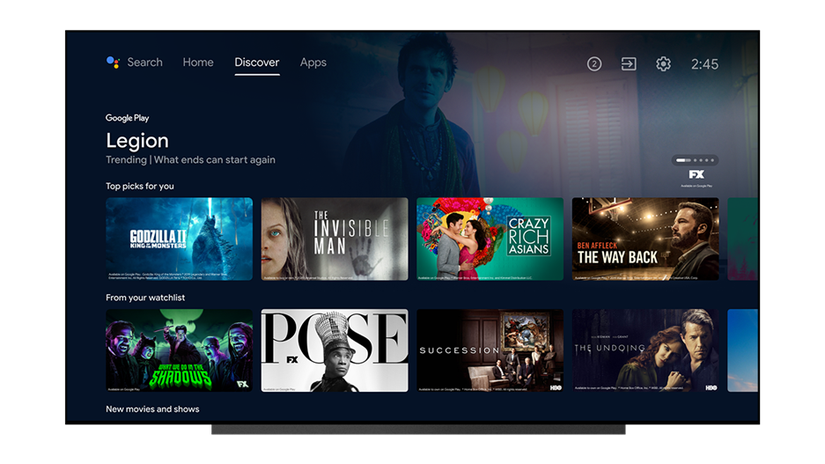
Home screens on smart TVs and streaming devices typically combine several placement types. You’ll see a mix of manually pinned tiles, recently used apps, editorial or curated rows, algorithmic recommendations, promoted placements, and app-store links. Common placement types include:
- Pinned or favorite apps: user-controlled shortcuts that remain in a fixed spot.
- Recents and continuing rows: apps and content recently used by the signed-in account.
- Recommendations/For You: rows generated by the platform using viewing history and metadata.
- Editorial or curated lists: human-curated selections from the platform or partner teams.
- Promoted or sponsored tiles: paid or commercial placements that vary by platform and market.
- App store discovery: in-app store sections, categories, and search results that lead users to installs.
Which of these appears and how prominently depends on the device maker (Roku, Amazon, Google, Samsung, LG, Apple, etc.), the operating system (Roku OS, Fire OS, Android TV/Google TV, Tizen, webOS, tvOS), firmware versions, and sometimes local regulations or carrier/retailer preloads.
Core signals that influence ranking and surfacing
While each platform keeps its exact algorithms private, platform owners commonly use a mix of the following signals:
- Engagement: frequency and recency of app launches or content watched from an app.
- Freshness: recently installed or updated apps may be highlighted for a short period.
- Personalization: viewing history, user profiles, and cross-service signals (where available) inform recommendations.
- Metadata quality: clear app names, icons, descriptions, and rich artwork help automated systems classify and present apps.
- Ratings and reviews: higher-rated apps can receive better visibility in store lists and recommendations.
- Editorial curation: hand-picked apps or collections promoted by the platform.
- Business relationships: some platforms offer paid placements or promotional programs; their presence and rules vary by platform and market.
- Compliance and technical fit: apps that follow platform guidelines, integrate properly with system features, and meet performance expectations are more likely to be eligible for certain placements.
Bear in mind that the weight assigned to each signal differs by platform and may change over time as platforms refine their approaches.
Typical platform behaviors (what to expect)
No single home-screen model applies everywhere, but these general behaviors are common:
- Most platforms show a mix of user-controlled and algorithmic content on the top rows.
- ‘Continue watching’ or ‘Recent apps’ rows reward apps that keep users returning.
- Curated editorial shelves highlight new or noteworthy apps and are often chosen by platform teams.
- Promoted tiles are possible on many platforms but are subject to policy and regional availability.
Because implementations vary, always consult a platform’s developer documentation and manufacturer support notes to confirm how placements work on a specific model.
What app developers and publishers can do to improve discoverability
If you’re building or promoting a streaming app, focus on signals platforms typically use and on giving users a reason to return.
Optimize store metadata
– Use clear, concise app names and localized descriptions.
– Provide high-quality icons and artwork that meet each platform’s design guidelines.
– Supply rich metadata (genres, keywords, categories) so automated systems can place your app into appropriate recommendations and categories.Improve first-run and onboarding experience
– Make sign-up and first‑time playback fast and frictionless.
– Offer helpful onboarding tips to get the user to first play quickly — many recommendation systems reward early engagement.Encourage regular engagement
– Feature fresh content and highlight new arrivals so users have a reason to come back.
– Use safe, respectful notifications or system integrations (where allowed) to alert users to new content without being intrusive.Localize and adapt
– Localized titles, descriptions, and artwork can improve discovery in different markets.
– Respect regional content preferences and legal requirements.Maintain app performance and compliance
– Meet platform quality criteria for stability, video playback, and responsiveness.
– Keep the app updated and address crashes quickly; platforms often penalize apps with poor reliability.Participate in editorial and partner programs
– Reach out to platform partner or developer programs to understand editorial opportunities and promotional programs.
– Be transparent about paid promotion and follow platform policies.Track and measure
– Use analytics to measure session length, retention, and conversion from store listings.
– Test different artwork and metadata in smaller markets where allowed before wide rollout.
These are general best practices; check each platform’s developer documentation for specific submission requirements and promotional opportunities.
Practical steps for viewers who want to discover new apps
If you’re a consumer trying to find new streaming apps on your TV, here are practical actions that work across most modern platforms:
- Explore the app store on your device rather than relying only on the home screen. The store usually offers categories, top charts, and editorial picks.
- Use the search box or voice assistant to look for genres, show names, or app names. Voice search can surface apps you wouldn’t find by browsing tiles.
- Check curated rows — platforms often run themed collections (sports, kids, news) that highlight relevant apps.
- Pin or add favorite apps to your home row when the platform allows it, so frequently used apps are always visible.
- Keep your device firmware and apps updated. New features and promotional programs sometimes arrive in system updates.
- Sign in with your account to enable personalization features; some recommendations are only available when a profile is active.
- Remove or hide apps you don’t use; decluttering the home screen can make new or relevant apps stand out more.
If you need step-by-step help setting up a device or managing apps, our guides on Devices & Setup and Apps & Tools cover common tasks and settings.
Comparison: common placement types and who controls them
Below is a high-level comparison of placement types and the party that typically controls them. This is generalized and may vary by platform and region.
| Placement type | Typically controlled by | Notes |
|---|---|---|
| Pinned / Favorites | User | Users usually choose; some devices allow quick pinning from a menu. |
| Recents / Continue watching | Platform (based on user activity) | Reflects what the user or household recently watched; often algorithmic. |
| Recommendations / For You | Platform algorithms | Uses viewing history, metadata, and personalization signals. |
| Editorial shelves | Platform editorial teams | Curated picks; may include partner suggestions. |
| Promoted tiles | Platform / commercial partners | Paid or promotional placements may appear; clearly labeled on many platforms. |
| App store lists | Platform store teams | Category pages, top charts, and search results are determined by store algorithms and editorial choices. |
Always verify the behavior on the specific platform you’re targeting by consulting developer resources or the device’s support pages.
Measuring success and realistic expectations
Discoverability is a long-term effort. Even with optimized metadata and quality UX, visibility can take time. Track the following metrics to evaluate whether your efforts are working:
- Installs from store listing and search conversions.
- First-week retention and 7/30-day retention rates.
- Session length and frequency of launches.
- Engagement with promoted content and deep links.
Expect seasonal variation and platform-specific differences in how quickly algorithmic recommendations respond to behavior.
FAQ
Q: Do home-screen recommendations use my viewing across all apps?
A: Many platforms personalize recommendations using the viewing history they can access, but cross-app signals depend on platform-level integrations, user opt-ins, and privacy rules. Some systems only use platform-level metadata (app launches and play events) rather than the exact titles you watch. Check your platform’s privacy settings for details.
Q: Can developers pay to appear on the home screen?
A: On many platforms there are promotional programs and paid placements, but availability, formats, and disclosure policies differ. Platforms usually require promoted placements to be clearly labeled. Developers should consult each platform’s partner or advertising documentation for details.
Q: If I uninstall an app, will it still be suggested to me?
A: Recommendations may still reference apps you don’t currently have installed, especially in store listings or editorial lists. If you repeatedly ignore suggestions, recommendation engines may reduce their prominence over time.
Q: Will pinning an app guarantee new users see it?
A: Pinning is a user action and ensures visibility for that user, but it’s not a mechanism for broader distribution. Developers can encourage users to pin apps, but platform-level visibility still depends on algorithmic and editorial factors.
Q: How do I know if a placement is organic or paid?
A: Platforms that accept paid placements typically disclose promoted content. If it’s unclear, check platform policy pages or reach out to platform support for clarification.
Q: Are there best practices for app artwork and icons?
A: Use clear, high-contrast icons, readable typography, and multiple sizes as required by each platform. Localize art where practical. Follow platform design guidelines to ensure your art renders correctly on different TV screens.
Conclusion
Home screens are the primary gateway to apps on connected TVs, but discoverability is a mix of product quality, metadata, engagement, editorial programs, and sometimes paid promotions. Developers should focus on metadata, onboarding, performance, and steady engagement to improve organic visibility. Viewers can use store browsing, search, and simple home-screen management to surface apps that match their interests.
Because platform behavior and promotional options vary, check official developer and support documentation for the specific devices and markets you care about. For practical device setup and app management tips, explore our Devices & Setup and Apps & Tools resources, or browse our Streaming Guides for end-user help. For privacy- and security-related considerations when enabling personalization, see our advice in Tech & Security.
Disclosure: Settings, features, and compatibility can differ by TV model, streaming device, operating system, region, and firmware version. Verify current platform documentation and manufacturer notes for specifics about home-screen behavior and promotional programs.

Canzar
Ready to stream? Pick your plan
Live TV, movies, sports and 10,000+ channels on any device — Firestick, Android TV, Smart TV, phone.
View Subscription Plans Compare Pricing
Moderation: Comments are reviewed before publishing. Be respectful and on-topic.
Guidelines: Share streaming tips, device help, or content recommendations. No spam, no promotions, no off-topic links.