
Last updated August 24, 2026 · Editorially reviewed by CanzarTV
How to Create an Ergonomic TV Viewing Distance and Angle Chart for Your Room
A good TV setup is more than picking a screen and plugging it in. To protect your neck, eyes, and comfort — and to get the most from 4K and 1080p panels — it helps to plan viewing distance and angle before you install. This guide shows how to build a simple, room-specific TV viewing distance and angle chart that you can use when choosing size, mount height, and tilt.
Why a viewing-distance-and-angle chart matters
An ergonomic chart translates measurements in your room into guidance you can act on: which TV sizes fit best, how far seats should be from the screen, where the screen center should sit relative to seated eye height, and how much tilt is appropriate if you mount the TV above eye level.
Good positioning reduces neck and eye strain, improves perceived sharpness (especially with 4K), and cuts reflections and glare. The advice below is intentionally conservative and model-agnostic — check your TV manufacturer documentation for any device-specific recommendations.
Basic rules of thumb (simple, quick)
- For 4K TVs: sit closer to enjoy detail — roughly 1.0× to 1.5× the screen diagonal.
- For 1080p (Full HD): sit farther — roughly 1.5× to 3.0× the diagonal.
- Aim for the center of the screen to be at or slightly below seated eye level. If mounting higher, tilt the screen down so the viewing angle is between 0° and about 15° below eye level.
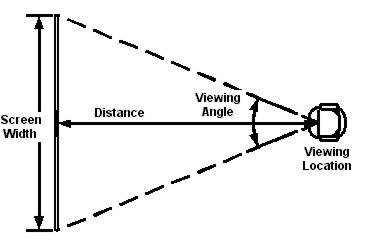
- Avoid extreme horizontal viewing angles. Try to keep primary seats within 15–30° of the screen center.
Those multipliers are general guidance used across home-theater recommendations and equipment testing. They assume average human visual acuity and living-room lighting; your eyes and room can change the best distance.
A practical distance chart (common TV sizes)
Below is a compact chart you can copy into your room notes. Distances are shown as ranges for 4K (closer) and 1080p (farther). Values are diagonal × multiplier, with conversions in meters and feet.
| TV size (diag) | 4K recommended distance | 1080p recommended distance |
|---|---|---|
| 43″ (1.09 m) | 1.1–1.6 m (3.6–5.4 ft) | 1.6–3.3 m (5.4–10.8 ft) |
| 50″ (1.27 m) | 1.3–1.9 m (4.2–6.3 ft) | 1.9–3.8 m (6.3–12.5 ft) |
| 55″ (1.40 m) | 1.4–2.1 m (4.6–6.9 ft) | 2.1–4.2 m (6.9–13.8 ft) |
| 65″ (1.65 m) | 1.7–2.5 m (5.4–8.1 ft) | 2.5–5.0 m (8.1–16.3 ft) |
| 75″ (1.90 m) | 1.9–2.9 m (6.2–9.4 ft) | 2.9–5.7 m (9.4–18.7 ft) |
| 85″ (2.16 m) | 2.2–3.2 m (7.1–10.6 ft) | 3.2–6.5 m (10.6–21.3 ft) |
Notes:
– Convert the diagonal to your preferred units and multiply by the ranges above to get a room-specific figure.
– The closer end of the 4K range is for viewers who want an immersive experience and have good visual acuity; the farther end is for a more relaxed sit-back arrangement.
How to build your own room chart (step-by-step)
- Measure seating positions.
– For each main seat, measure the straight-line distance to the proposed TV wall or mount. Record those distances. - Note screen resolution that matters to you.
– If you buy a 4K TV, use the 1.0–1.5× diagonal rule; if 1080p, use 1.5–3.0×. - Choose candidate TV sizes and calculate distances.
– Multiply each candidate diagonal by the above multipliers to make size-specific ranges and compare them to your measured seating distances. If most seats fall inside a size’s recommended range, that size is a strong candidate. - Decide mounting height and tilt.
– Measure seated eye height at your couch (sit where you usually sit, measure from floor to eyes). The center of the TV ideally sits at or slightly below that number. If you must mount higher, plan a tilt. Use the steps below to calculate exact height and tilt. - Consider horizontal spread.
– If seating is wide (e.g., a sectional), measure lateral angles. Use the TV center as 0°: any seat more than ~30° off center will see reduced picture consistency on many panels. - Factor in glare and lighting.
– If windows or lights cause reflections at typical seating angles, consider an anti-glare placement, blackout curtains, or a slight tilt. - Make a final chart.
– For each seat list: seat label, distance, recommended TV size range, recommended center height, recommended tilt angle. This becomes your room chart when shopping or installing.
Calculating center height and tilt (math you can use)
Seated eye height method (recommended):
1. Sit on your couch in the usual spot and measure the vertical distance from the floor to your eyes (E).
2. Measure your TV screen height (H). If you only know diagonal and aspect ratio (16:9), compute height = diagonal × 0.49 (approx.). Example: a 55″ 16:9 screen has height ≈ 55 × 0.49 ≈ 27 in (68.6 cm).
3. Set center of TV at height C = E (so center matches eye level) or slightly below, e.g., C = E − 5–15 cm for a comfortable downward gaze.If mounting higher than recommended, calculate tilt angle:
1. Measure vertical distance from eye level to TV center (V). Positive if TV center is above eye level.
2. Measure horizontal seating distance from eyes to screen plane (D).
3. Tilt angle ≈ arctangent(V / D) — this gives the angle between your line of sight and a straight-ahead horizontal line; tilt downward a similar angle to compensate. Keep tilt under about 15° for comfort; large tilts can cause reflection and uneven display performance on some TVs.
Example: seated eye height E = 100 cm; TV center is mounted at 130 cm, so V = 30 cm. If D = 300 cm, tilt ≈ arctan(30/300) = arctan(0.1) ≈ 5.7°. A small tilt (5–8°) is sufficient.
Horizontal viewing angles and seating layout
- Aim to keep your main seating within 15°–30° of the screen center. Beyond that range viewers may perceive color and brightness shifts on many TV panels.
- For large groups or wide couches, consider a slightly larger TV or multiple viewing zones (e.g., a secondary display or adjustable mount) to keep each viewer inside a comfortable angle.
TV tilt angle for couch: practical guidance
- Wall-mounted at optimal height (center at or slightly below eye level): no tilt needed.
- Wall-mounted higher than eye level (over a fireplace or high wall): tilt down 5°–15° depending on how high; calculate using the method above.
- Use a mount with angle adjustment to fine-tune — a few degrees makes a big difference.
- Keep tilt modest to avoid reflections and maintain panel uniformity; if glare persists, address room lighting first.
Special considerations for 4K and high-resolution sets
4K resolution lets you sit closer without seeing pixel structure. That means:
– You can choose a larger screen at the same distance for more immersion.
– If you prefer a cinematic field of view, sit toward the closer end of the 1.0–1.5× range.
However, perceived sharpness also depends on source quality, upscaling, and content type. Manufacturers and streaming services update processing algorithms and codecs, so check device documentation and tweak settings after installation.
Example room scenario (putting it all together)
Room: living room with sofa 3.0 m from TV wall. Seated eye height measured at 105 cm.
- Candidate TVs: 55″, 65″.
- 55″ 4K recommended: 1.4–2.1 m — too close for 3.0 m (would be fine but not immersive); 55″ 1080p recommended: 2.1–4.2 m — 3.0 m fits.
- 65″ 4K recommended: 1.7–2.5 m — a bit close; 65″ 1080p recommended: 2.5–5.0 m — 3.0 m fits well.
Conclusion: For a 3.0 m seat, a 65″ 4K is a good choice if you like a slightly more immersive feel (sitting near the far end of the 4K range). A 65″ 1080p also works. For maximum detail at 3.0 m, a 4K panel at 65″ or larger will be most flexible.
Quick checklist before you buy or mount
- Measure seating distances from where people will actually sit.
- Measure seated eye height rather than guessing.
- Consider your primary content (sports and fast motion vs. movies vs. gaming).
- Factor in viewing angles and glare sources.
- Use a mount with tilt if you can’t place the TV at eye level.
- After installation, sit at primary seats and fine-tune tilt and brightness/contrast for comfort.
For step-by-step setup, mounting tips, and cable routing, see our Devices & Setup hub and practical guides on mounting and setup: Devices & Setup and deeper tips at Blog.
FAQ
Q: How do I know my seated eye height?
A: Sit normally on your couch and have someone measure from the floor to the center of your eyes. If you’re alone, sit with a book at eye level and measure the book’s height. Typical seated eye heights vary; always measure for accuracy.
Q: Is a 55″ 4K TV best at 2–3 meters?
A: For 55″ 4K, the generally recommended viewing distance is about 1.4–2.1 meters (4.6–6.9 ft). At 2–3 meters you’ll still get a good experience; the farther end is less immersive but still fine. If you plan to sit closer, a 4K panel keeps the image sharp.
Q: What if my TV must be mounted above a fireplace?
A: Measure the vertical offset from seated eye height and use the arctan(V/D) method to estimate tilt. Keep downward tilt modest (5°–15°) and test for reflections and viewing comfort. If possible, lower the TV or use a mantlebuilt-in projector/alternative placement for prolonged viewing.
Q: Do curved TVs change the viewing-angle math?
A: Curved TVs can improve off-axis color and perceived depth for a narrow sweet spot. However, they don’t change the distance multipliers much. Curved panels work best when a small number of viewers sit centered and at the recommended distances.
Q: Will HDR or picture modes change the recommended distance?
A: Not significantly. HDR affects brightness and contrast, not physical viewing geometry. However, brightness, tone mapping, and content type can influence perceived comfort, so tweak picture modes after placement.
Conclusion
Creating a TV viewing distance and angle chart for your room is straightforward: measure, choose the resolution and candidate sizes, multiply diagonals by recommended multipliers, and calculate center height from seated eye level. Use modest tilt only when needed, prioritize keeping main seats within 15°–30° horizontally, and fine-tune after installation.
Small adjustments in height and a few degrees of tilt can make a big difference in comfort. If you want more hands-on mounting and setup tips, check our practical articles at Devices & Setup and general advice on placement at Blog. For optimising content delivery and apps for your TV, see Apps & Tools.
Disclosure: Settings, panel behaviour, and compatibility can differ by TV model, device, operating system, region, and firmware version. Always verify specifics in the manufacturer documentation and test settings in your room after installation.
References and further reading
- RTINGS — How Far Should You Sit from a TV? (measurement-based guidance)
- THX — Viewing Distance recommendations and immersive FOV
- CNET — How far should you sit from a TV? (buying and placement guide)
- SMPTE (Society of Motion Picture and Television Engineers) — technical recommendations and standards (general reference)

Canzar
Ready to stream? Pick your plan
Live TV, movies, sports and 10,000+ channels on any device — Firestick, Android TV, Smart TV, phone.
View Subscription Plans Compare Pricing
Moderation: Comments are reviewed before publishing. Be respectful and on-topic.
Guidelines: Share streaming tips, device help, or content recommendations. No spam, no promotions, no off-topic links.