
Last updated August 25, 2026 · Editorially reviewed by CanzarTV
Guide to Choosing a Universal Hub vs Dedicated Remotes for Multi-Device Living Rooms
Choosing the right way to control a modern living room — where a smart TV, streaming box, AV receiver, soundbar, game console, and lights coexist — comes down to a trade-off between centralization and specialization. A universal hub aims to consolidate control into a single interface or device, while dedicated remotes (manufacturer remotes) keep controls specific to each device. This guide explains how each approach works, practical steps to decide which is right for you, and how to set up whichever path you choose.
Why this choice matters
A comfortable, reliable control system affects everyday experience: quick channel changes, consistent volume control, and minimal fuss for guests. The wrong choice can mean confusion, dead batteries at inconvenient times, or repeated troubleshooting. Conversely, the right system reduces friction and makes your living room more enjoyable.
This article is aimed at people comparing a universal hub vs dedicated remotes for home theater setups. It explains trade-offs, compatibility considerations, and real-world scenarios so you can make an informed decision.
How universal hubs and dedicated remotes work
What is a universal hub?
A universal hub (sometimes called an all-in-one hub, smart home hub, or single-collar control center in some industry language) is a device or software platform that translates commands into the signals your various devices understand. A hub may use infrared (IR), Bluetooth, Wi‑Fi, Zigbee, Z‑Wave, HDMI‑CEC, or cloud APIs to control TVs, set-top boxes, AV receivers, streaming sticks, smart lights, and thermostats.
Key points:
– Hubs centralize control — one physical remote, mobile app, or voice assistant can operate many devices.
– Hubs often offer automation (scenes), macros (sequence of commands), and integration with smart home ecosystems.
– Capabilities and device support vary by hub model and the protocols it supports.
What are dedicated remotes?
Dedicated remotes are the manufacturer-provided controllers for individual devices (TVs, soundbars, Blu‑ray players, game consoles). They typically communicate by IR, RF, or Bluetooth and are optimized for the device they accompany.
Key points:
– Dedicated remotes are designed for full access to that device’s features and special menus.
– They usually offer reliable point-and-press control without intermediary translation.
– Multiple dedicated remotes can coexist, requiring users to switch between them or learn which remote controls which device.
Pros and cons: at a glance
| Factor | Universal Hub | Dedicated Remotes |
|---|---|---|
| Convenience | Central control, fewer devices to find | Simple, device-specific control when needed |
| Learning curve | Some setup/learning required | Minimal — ready out of the box |
| Feature completeness | May miss niche device features unless supported | Full native feature access |
| Reliability | Depends on hub translation and networks | Very reliable for the device it ships with |
| Automation & scenes | Strong — multi-device sequences possible | Limited to device capabilities |
| Guest friendliness | Can be simplified for guests | Guests need to manage multiple remotes |
| Cost | One hub/remote can be cost-effective long-term | May be cheaper initially but clutters over time |
These are general tendencies; exact behavior depends on specific products, firmware, and how you configure them.
Key factors to consider when choosing
Devices you need to control
– Count every device that must be operated: TV, receiver, set-top box, streaming stick, soundbar, gaming console, lighting, blinds, etc. Some hubs manage only entertainment devices, while others extend into the broader smart home.Protocols and compatibility
– Check whether your products use IR, Bluetooth, Wi‑Fi, HDMI‑CEC, or smart home protocols like Zigbee or Matter. Hubs vary widely in supported protocols and in the quality of device profiles. Always verify current manufacturer documentation for compatibility.Desired user experience
– Do you want one button to switch the room into “movie mode” (dim lights, switch TV input, set receiver to surround)? Or do you prefer separate remotes for quick access to device-specific features (e.g., game console menus)? If convenience and a simplified routine matter, a hub may be better. If full native device control matters most, dedicated remotes may win.Guests and multi-user households
– Hubs can be simplified for guests or mapped to voice assistants. Dedicated remotes are familiar but multiply clutter. Think about how often guests or children need to use the system.Reliability vs complexity
– Manufacturer remotes tend to be simple and reliable. Hubs introduce more moving parts (network, cloud services, translations), which can create more points of failure if misconfigured.Budget and upgrade path
– Hubs can be an upfront investment but reduce the need for multiple specialty remotes. Verify that the hub’s software is supported and updated, especially if you plan to keep it long-term.Privacy and security
– Hubs that connect via cloud services may share telemetry externally. If privacy is a concern, research the vendor’s practices and consider local-only solutions where possible. For general best practices see Tech & Security.
Typical living-room scenarios and recommended directions
Minimalist streaming-only setup (TV + streaming stick): A universal hub or a smart TV with a single learning remote can keep controls simple. Often the TV’s built-in remote plus HDMI‑CEC might be enough.
AV heavy setup (AV receiver, multiple sources, soundbar, projector): A universal hub or a programmable learning remote that supports AVR macros makes complex sequences easier (input switching, surround modes). Manufacturer remotes will still be useful for deep menu access.
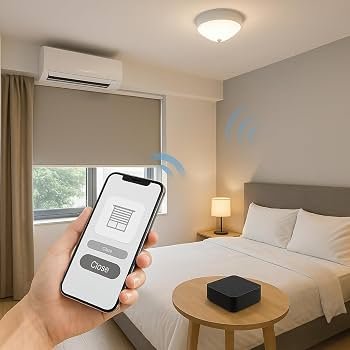
Mixed smart home (lights, shades, TV, speakers): A universal hub that integrates entertainment and smart home devices offers powerful scenes. If privacy or simplicity is paramount, you can restrict hub functions to entertainment only.
Frequent guests or rentals: Consider a simplified universal interface or dedicate a single “guest remote” preprogrammed for basic functions. That reduces confusion compared with multiple dedicated remotes.
Practical steps to decide and set up
Follow these steps to choose and deploy the best control approach for your living room.
Step 1 — Inventory and priority list
- List every device you need to control.
- For each device note control method (IR, Bluetooth, Wi‑Fi, HDMI‑CEC) and any special features you need to access.
- Rank priorities: convenience, full feature access, automation, or privacy.
Step 2 — Research compatibility
- Match your device list against potential hubs or learning remotes. Look for community compatibility lists or the vendor’s official database, and confirm in product documentation.
- If your devices rely on manufacturer cloud integration (e.g., smart TV cloud APIs), confirm the hub’s method to integrate — cloud, local network, or both.
Step 3 — Choose a control strategy
- If you want central control and automations: choose a hub that supports the protocols your devices use.
- If you value simplicity and device-level reliability: keep dedicated remotes, and optionally add a simple learning remote to cover the few overlapping tasks.
Step 4 — Plan the physical setup
- IR line-of-sight: If a hub uses IR, plan placement or use an IR blaster/eye so it can reach devices in cabinets.
- Network and power: Hubs relying on Wi‑Fi or Ethernet need stable connectivity and power. Consider backup procedures if your hub uses cloud services that may go offline.
Step 5 — Configure and test
- Start with core tasks (power, input switching, volume) and test each device.
- Create a basic “watch a movie” scene and verify every step works reliably.
- Keep a manufacturer remote handy for troubleshooting and advanced menus.
Step 6 — Simplify for daily use
- Reduce available buttons for guests or create labeled buttons on the hub’s app or remote.
- Document one-line instructions for family members (e.g., “Press Watch > Movie” or “Use Voice: ‘TV On’”).
Comparison: common hub features vs dedicated remote strengths
- Learning and macros: Hubs and some learning remotes support macros; manufacturer remotes usually don’t.
- Voice control: Hubs can integrate voice assistants; dedicated remotes sometimes include voice but may be limited to device functions.
- Firmware updates: Hubs rely on vendor updates for new device support; dedicated remotes get firmware from their device makers and typically remain compatible for the life of the device.
- Local vs cloud control: Some hubs work locally, others require cloud services. Dedicated remotes usually work locally.
Troubleshooting tips
- If a hub loses control after an update, check for firmware updates for both hub and your devices and consult vendor support.
- For IR issues, verify that the hub or blaster has a clear line of sight or relocate devices to a cabinet with an external IR blaster.
- If voice commands behave unpredictably, confirm language/region settings and whether the hub uses cloud recognition.
FAQ
Q: Will a universal hub control every brand of TV and receiver?
A: Not necessarily. Hubs vary by supported protocols and device profiles. Many hubs cover common brands, but you should verify the hub’s compatibility list and current manufacturer documentation for your devices.
Q: Are universal hubs slower or less reliable than dedicated remotes?
A: Hubs introduce translation layers and may rely on networks or cloud services, so there is potential for added latency or points of failure. However, many hubs are fast and reliable when configured correctly and connected over a robust network. For mission-critical reliability, keep manufacturer remotes as backups.
Q: Can I keep manufacturer remotes after installing a hub?
A: Yes. Many users keep dedicated remotes for device-specific functions and use the hub for everyday convenience and scenes.
Q: Do hubs threaten privacy because they use the cloud?
A: Some hubs use cloud processing for voice or device control; others work locally. If privacy is important, review the vendor’s privacy policy and prefer local-only control options where available. See our coverage in Tech & Security.
Q: What about HDMI‑CEC — is that a hub?
A: HDMI‑CEC is a protocol built into HDMI that allows devices on the same HDMI chain to send basic commands to each other (power, input switching). It’s not a standalone hub, but it can reduce the need for a separate universal controller in simple setups.
Q: Should I buy a learning remote or a modern smart hub?
A: If you want deep physical-button control and one device to emulate others via IR, a high-quality learning remote could be enough. If you want automation, voice control, or smart-home integration, a hub may be better.
Quick decision flow (summary)
- If you want automation and central control for entertainment + smart home: choose a universal hub.
- If you rely on niche device features and want the most reliable, plug-and-play experience: stick with dedicated remotes.
- If you want a mix of convenience and full control: use a hub for daily scenes and keep manufacturer remotes for advanced menus.
Additional resources
- For setup tips and device walkthroughs, see our Devices & Setup guides.
- To explore streaming-focused control strategies and troubleshooting, check our Streaming Guides section.
- For privacy and security guidance when choosing cloud-connected hubs, visit Tech & Security.
Conclusion
There’s no one-size-fits-all answer to universal hub vs dedicated remotes for home theater. Your ideal path depends on the mix of devices you own, how much automation and simplicity you want, and how much time you’re willing to spend on setup and maintenance. A universal hub can drastically simplify day-to-day control and power useful automations, while dedicated remotes provide device-specific reliability and access to every manufacturer feature. Many households find a hybrid approach — hub for scenes and common tasks, manufacturer remotes for troubleshooting and advanced functions — to be the practical middle ground.
Disclosure: Settings and compatibility can differ by TV, device, operating system, region, and firmware version. Always verify compatibility with current manufacturer documentation before purchasing or committing to a central control strategy.

Canzar
Ready to stream? Pick your plan
Live TV, movies, sports and 10,000+ channels on any device — Firestick, Android TV, Smart TV, phone.
View Subscription Plans Compare Pricing
Moderation: Comments are reviewed before publishing. Be respectful and on-topic.
Guidelines: Share streaming tips, device help, or content recommendations. No spam, no promotions, no off-topic links.